

How to Rank in ChatGPT When You Sell to Other Businesses

To rank in ChatGPT as a B2B supplier, publish one text-based page for every question your buyers ask, state specs, price drivers and lead times in plain text, add your own figures, and keep the same facts consistent on distributor pages, review sites and directories. ChatGPT names the supplier whose pages best match the buyer’s prompt.
TL;DR
- A July 2026 Semrush survey of 519 US B2B professionals who use AI found 53% chose the vendor the AI matched to their prompt and use case. Only 7% went by brand name.
- ChatGPT has no ranking table to climb. It builds a shortlist from pages it can read and facts it can confirm in more than one place.
- Seven steps get an owner-led manufacturer onto that shortlist: collect the buyer prompts, build a page for each question, write specs as text, add your own numbers, match your story across outside sites, open the door to AI crawlers, and test every month.
- Keyword stuffing earns little in AI answers. A 2024 KDD paper on generative engine optimization found it gave almost no lift.
- Start with your three most profitable product lines. A first round of pages takes about four weeks.
A buyer at one of your best target accounts opens ChatGPT and types a long, specific question about the part you make. Four suppliers come back in the answer. If you are not one of them, the buyer never visits your website, never sees your trade show booth ad, and never learns that you have shipped that exact part for twenty years.
That is the problem this guide solves. Most owner-led manufacturers built their websites to be recognized by people who already know the name. The brand-first website is a poor fit for a buyer whose AI assistant is choosing among suppliers it has never heard of.
This guide gives you seven steps to change that, in the order we would run them with a client. It builds on the LLM SEO guide, which explains how AI assistants find, read and compare suppliers, and moves from explanation to a checklist you can start this week.
What does it mean to rank in ChatGPT?
Ranking in ChatGPT means your company is named, described or linked in the answer ChatGPT gives to a buyer’s question. There is no page-one position to hold. Each answer is assembled fresh, and your company is either in it or absent from it.
Two things make this different from Google. First, the answer is a short list, often three to five names, so there is no page two to catch the buyer who scrolls. Second, the list changes with the wording of the prompt. A supplier that appears for “ISO 13485 contract machining for orthopedic implants” can vanish for a prompt that adds a delivery window.
Defined Term: Prompt match.
The degree to which a page answers the specific question a buyer typed into an AI assistant, including the part, material, standard, quantity, region and timeline the buyer named. A strong prompt match is the main reason an AI assistant names one supplier over another.
For an owner, the practical meaning is simple. You are no longer competing for a position. You are competing to be the best answer to each question a buyer might ask.
Why does ChatGPT pick one supplier over another?
ChatGPT picks the supplier whose pages and outside mentions best match the buyer’s prompt and use case, and buyers act on that pick. In the Semrush survey of 519 US B2B professionals who use AI, 53% chose the vendor the AI matched to their prompt and use case. Seven percent chose by brand name.
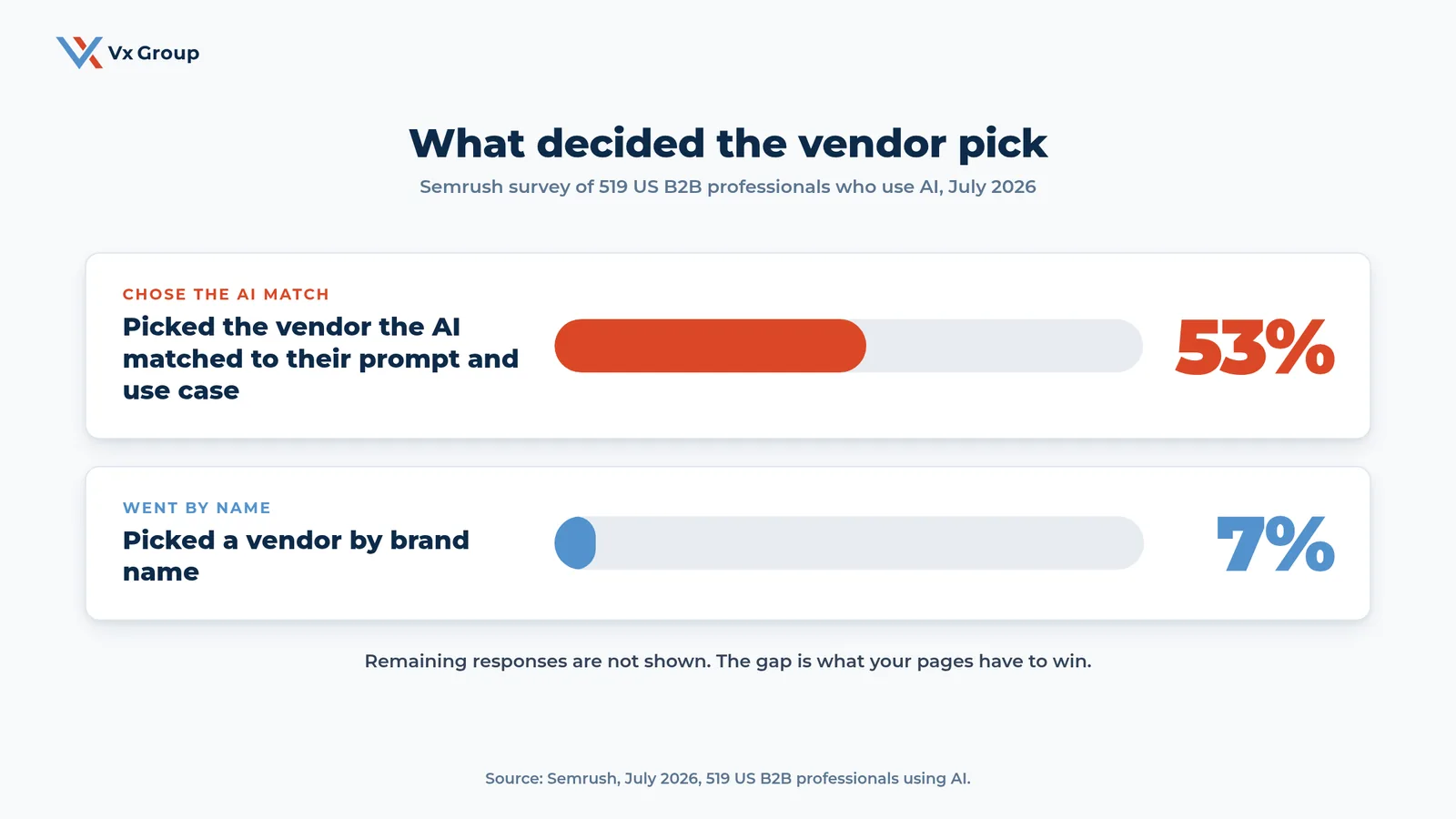
Brand name still helps with trust once a buyer sees you on the list. The survey result says the first filter has moved. Buyers let the assistant narrow the field, and the assistant narrows it by fit.
Three practical facts follow from how these assistants work:
- They read pages as text. Specs locked in a PDF, an image or a drawing are hard for an assistant to use. We cover that in PDF SEO.
- They break a long prompt into several smaller searches. A single buyer question becomes a handful of lookups, so you need pages that answer the pieces as well as the whole.
- They cross-check. A claim that appears on your site, on a distributor’s site and in a directory carries more weight than a claim that appears once.
Old SEO habits also lose value here. The 2024 KDD paper on generative engine optimization tested nine ways of rewriting content and found that keyword stuffing gave little to no improvement in AI answers. Repeating “CNC machining services” forty times on a page does nothing for the buyer or the assistant. The full comparison of old and new habits is in SEO vs AEO.
How do you rank in ChatGPT? The seven steps at a glance
You rank in ChatGPT by completing seven steps: collect buyer prompts, build a page per question, write specs as text, add your own numbers, match your story across outside sites, open the door to AI crawlers, and test monthly. The table shows what each step produces and how long it takes a small team.
| Step | What you do | What you have when done | Typical effort |
|---|---|---|---|
| 1 | Collect the prompts your buyers use | A list of 20 buyer questions ranked by deal size | 2 to 3 hours |
| 2 | Build one page per buyer question | A page map tied to your top product lines | 1 week |
| 3 | Write specs, price drivers and lead times as text | Pages an assistant can quote line by line | 1 to 2 weeks |
| 4 | Add your own figures and point of view | Numbers and opinions found nowhere else | 3 to 4 hours per page |
| 5 | Match your story on outside sites | One fact sheet used on distributor, review and directory listings | 1 to 2 weeks |
| 6 | Open the door to AI crawlers | Crawl settings and page access confirmed | 1 to 2 hours |
| 7 | Test monthly and log the result | A ten-prompt scorecard that tracks change | 1 hour per month |
The effort column reflects what we see when an owner assigns one person to the work. Your team may run faster or slower.
Step 1: How do you find the prompts your buyers actually use?
Start with the questions your buyers ask your own team, because those are the same questions they type into ChatGPT. You already hear them every week on quote requests, sales calls and trade show floors.
Pull 20 real questions from the last 90 days
Open your last 20 quote requests and your sales team’s call notes. Copy the buyer’s wording exactly, including the part, material, standard, quantity and deadline. Paste each into a spreadsheet with four columns: the question, the product line, the account size, and whether you won the work.
Rewrite each question as a full prompt
Buyers type longer prompts into an assistant than into Google. Turn “stainless fittings 3-A” into the sentence a buyer would write. Here is an illustrative example: “Which US manufacturers make 316L stainless sanitary tri-clamp fittings with 3-A certification and can ship a 500-piece order within three weeks?”
Rank the prompts by deal size
Sort the list by the revenue behind each question. Your top five prompts set the first five pages you build. A question from a $400,000 account outranks ten questions from one-time buyers.
Ask each buyer role separately
The person who sets the spec, the person who checks quality and the person who approves the price all ask different questions. If your deals involve several people, read the B2B buying committee guide and write at least one prompt for each seat.
Step 2: How do you build one page for every buyer question?
Build one page per buyer question, with the question as the page’s main heading and the answer in the first two sentences. An assistant that pulls one chunk of a page needs the chunk to stand on its own.
Map each prompt to a single page
Group your prompts by product line and decide which already have a page. A catch-all “Capabilities” page that lists forty services answers none of them well. Give each high-value question its own address, such as a page on 3-A certified tri-clamp fittings for dairy processors.
Open with a direct answer of 40 to 60 words
State what you make, for whom, to which standard, and with what lead time. Keep the first sentence free of adjectives. “We machine 316L stainless sanitary fittings to 3-A standards for dairy and beverage plants, shipping standard orders in ten working days” gives an assistant a fact it can use.
Phrase each section heading as a buyer question
Headings such as “What lead time can you hold on a 500-piece order?” match the way buyers prompt. Answer each heading in its first sentence, then add detail below it.
Link each page to the pages around it
Connect product pages to the industry pages, the quality pages and the case pages they relate to. Our guides on B2B website redesign and SEO for manufacturing companies cover site structure in more detail.
Step 3: How do you write specs, prices and lead times so ChatGPT can quote them?
Write every fact a buyer would check as plain text on the page: specs, tolerances, certifications, minimum order, lead time and what moves the price. Facts inside images, drawings and PDFs are the ones an assistant skips.
Put the spec table in the page itself
Build a real table with one row per product and columns for material, size range, tolerance, standard and certification. Keep units on every number. A table gives the assistant a clean row to lift and gives the buyer a quick way to compare.
Name the price drivers
Say what moves the price: material grade, tolerance, quantity breaks, finish and rush fees. A full price list can stay private. If the topic is blank, the assistant fills the gap with a guess or with a competitor’s numbers.
State lead time as a number with conditions
“Fast turnaround” gives an assistant nothing to compare. “Ten working days on stock sizes, four weeks on custom tolerances under plus or minus 0.001 inch” gives it a fact. Update the number when your shop’s real lead time changes.
List certifications with the certificate body and number
Write “AS9100 Rev D, certificate issued by [your registrar]” as text. A logo in the footer tells the assistant very little. If a certification is in progress, say so with the expected date.
Name two customers you can reference
An assistant, like a human buyer, trusts a claim that a named company will confirm. Add two named references with the industry and the part you supply, after you have their permission.
Ready to grow?
See how your current product pages read to the AI assistants your buyers already use.
Step 4: How do you add your own figures and point of view?
Add numbers and positions that come from your own shop, because an assistant looks for information it cannot find on ten other sites. A page that repeats what every competitor says gives the assistant no reason to quote you.
Publish three numbers only you have
Pick figures from your own operation: on-time delivery rate over the last 12 months, average first-article pass rate, years of continuous supply to your top customer. Label each with its period and how you measure it. Keep the number true. Buyers and assistants both check.
Write one position you would defend to a customer
State what you believe about your part of the industry in one or two paragraphs. For example, you might explain why you quote tighter tolerances only after reviewing the drawing. A clear position gives the assistant something specific to attribute to you.
Show a before-and-after from a real job
Describe one project in four lines: the buyer’s problem, what you changed, the result in numbers, and the customer’s name if they agree. Short job summaries read well to buyers and give an assistant a concrete example to cite. Our piece on industrial content marketing explains how to collect these without a big content team.
Date every page and refresh it
Add a “last reviewed” date and revisit each page every quarter. Assistants favor current information, and an outdated lead time can send a buyer to a competitor.
Step 5: How do you make outside sites tell the same story as your website?
Make your distributor pages, review-site profiles and industry directory listings state the same facts as your own pages, because assistants cross-check a supplier across several sources before naming it. A mismatch between sources lowers the assistant’s confidence in all of them.
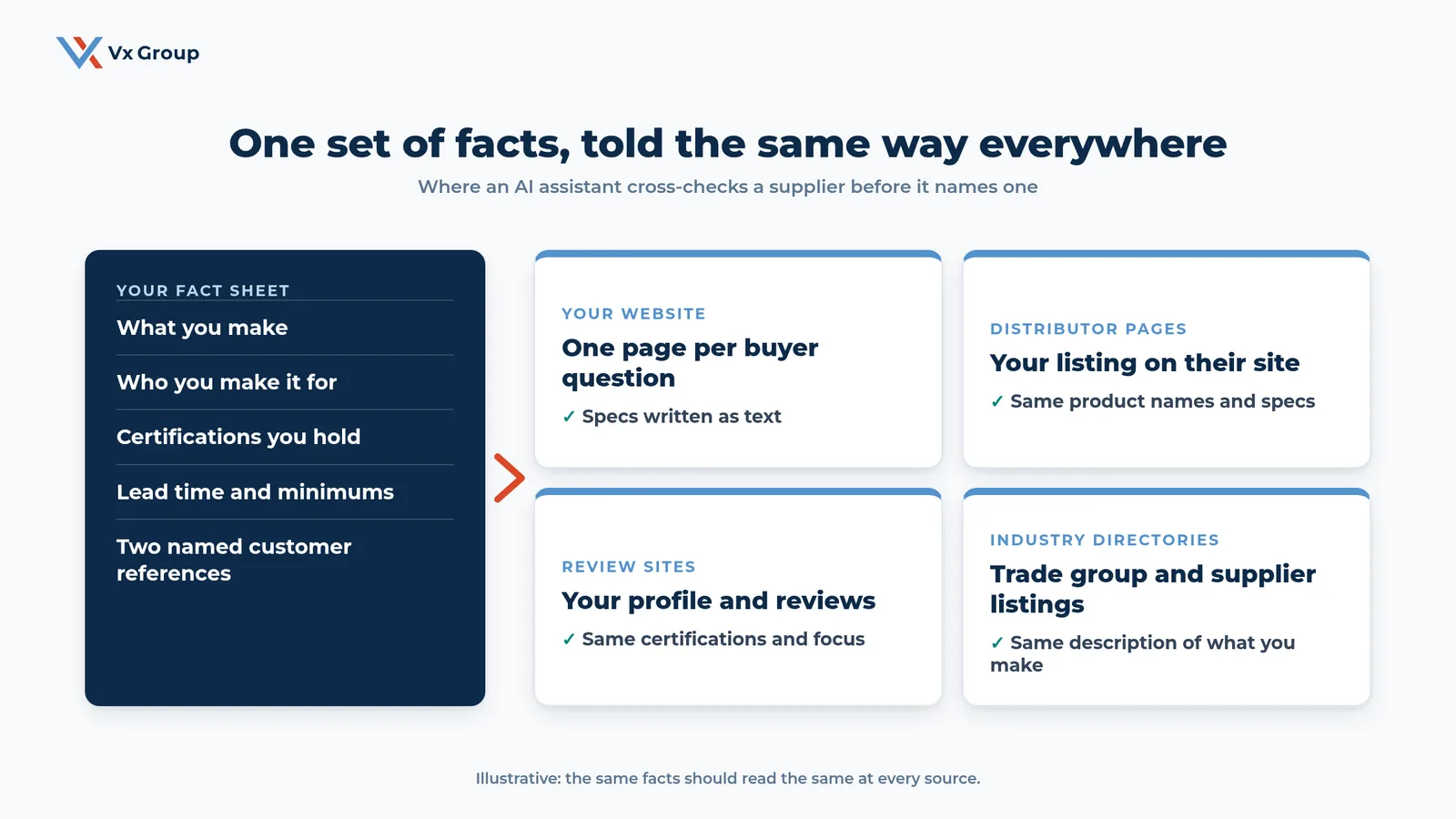
Write a one-page fact sheet
List what you make, who you make it for, certifications, lead time, minimum order and two named references. Use the same product names and the same wording each time. This single page becomes the source for every listing you update.
Audit your distributor listings
Search for your company on the sites of your three largest distributors. Check product names, specs and certifications against your fact sheet, then send each distributor a corrected block of text. If your channel is large, the channel sales strategy guide covers how to keep partners current.
Claim and correct your review and directory profiles
Look for your company on industry directories, trade association member lists and the review sites your buyers use. Claim each profile and replace stale descriptions with fact-sheet language. Ask three happy customers to leave a review that names the part you supply.
Set a quarterly check
Put a recurring reminder on one person’s calendar to compare outside listings with the fact sheet. Drift happens when a distributor rewrites your description or a directory resets a profile.
Step 6: How do you let ChatGPT's crawler reach your pages?
Confirm that your site allows the crawlers AI assistants use and that your best pages sit outside logins, forms and scripts that hide text. ChatGPT cannot quote a page it cannot open.
Check your robots.txt file
Open yourdomain.com/robots.txt and look for rules that block AI crawlers. OpenAI documents separate crawlers for search and for model training, so read its current crawler documentation before you decide which to allow. Many companies block everything by accident through a plugin or a security setting.
Remove login walls from spec and capability pages
Buyers love a gated catalog because it captures an email. An assistant cannot log in. Keep the facts public and gate only the CAD files or the price book.
Make sure the text exists in the page source
Right-click a key page, choose “view page source,” and search for a spec you know is on the page. If the number is missing, the site is building it with a script, and many crawlers will never see it. Ask your web developer to render the text on the server.
Convert your top PDFs into pages
Move the specs from your three most-requested catalog PDFs onto real pages. Leave the PDF available as a download for buyers who want it.
Step 7: How do you test whether ChatGPT is naming you?
Test with a set of ten buyer prompts, run them in ChatGPT and at least one other assistant each month, and log whether you appear, how you are described and who else is named. Without a log you cannot tell which change moved the result.
Build the ten-prompt scorecard
Take the top ten prompts from Step 1. Create a sheet with columns for the date, the assistant, the prompt, whether you appeared, how you were described, and which competitors appeared. Run each prompt in a fresh chat so earlier conversations do not shape the answer.
Record the description
If ChatGPT names you, copy the one-line description it gives. Wrong lines point to the page or listing that taught the assistant the error, so fix the source.
Track competitors who appear
Note which suppliers show up for each prompt, and read the pages that earned them the mention. Take the structure and the coverage from what you see. Keep your own facts and wording.
Review the log with your team monthly
Spend 30 minutes with sales and marketing. Pick the one prompt where you are missing and assign a page or a listing fix. Repeat next month.
What mistakes keep suppliers out of ChatGPT answers?
Four mistakes account for most of the misses we see in manufacturer sites:
- Specs live in a PDF or an image. The assistant skips them, so the page matches fewer prompts.
- One page covers every service. A broad page answers no specific question well.
- Outside listings disagree with the website. Conflicting lead times, certifications or product names lower confidence in the supplier.
- The site blocks crawlers. A security plugin or a login wall hides the pages from the assistant.
A fifth habit is waiting for certainty. The tools and the assistants change often. The steps above stay useful through those changes because they all come down to publishing accurate, specific facts that a buyer can verify.
Where should an owner start this week?
Start with your three most profitable product lines and one person on your team who can own the work. Run Step 1 on Monday, build the first three pages over the next two weeks, and run your first ten-prompt test at the end of week four.
Here is a week-by-week plan:
- Week 1: Pull 20 buyer questions, rank them by deal size, and write the fact sheet.
- Week 2: Build or rewrite the top three pages with text specs, price drivers, lead times and two named references.
- Week 3: Correct distributor and directory listings, and check robots.txt and login walls.
- Week 4: Run the ten-prompt test, log the results, and pick next month’s three pages.
The first test often turns up something. Some find a competitor described with their own certifications. Others find an old lead time repeated across three sites. Both are fixable in an afternoon once you know about them.
If your team lacks the time or the outside view, a short review of the pages your buyers meet first can show where an assistant loses the thread. For help turning the steps into a plan, read our guide on AI for manufacturing or talk to us directly.
Ready to grow?
Bring your top three product lines and we will map the buyer questions your pages need to answer.
Related posts
- LLM SEO: How AI Finds, Reads, and Compares B2B Suppliers
- SEO vs AEO: What Changed and What Still Works
- PDF SEO: Why AI Skips the Specs in Your Product Catalog
FAQs
About the Author: David Tisdale
