

LLM SEO: How AI Finds, Reads, and Compares You

LLM SEO is the work of making your company easy for an AI assistant to find, understand, and recommend when a buyer asks it for suppliers. The assistant turns one buyer question into several searches, reads a few pages, and names a short list. A supplier makes that list by passing three tests: visibility, clarity, and corroboration.
TL;DR
- A buyer’s question to ChatGPT, Gemini, Claude, or Perplexity becomes a handful of background searches. The AI reads a few pages from those searches and builds a shortlist from them.
- Three tests decide who makes the list: visibility (can the AI find you), clarity (can it tell exactly what you do), and corroboration (do other sites say the same thing about you).
- Many manufacturers fail the first test without knowing it. Specs sit in PDFs, product pages are thin, and the homepage describes the company in slogans.
- A page the AI can quote has a plain H1, a 40 to 60 word direct answer, a short summary, question headings, defined terms, data in tables, and an FAQ with schema.
- You can check your standing in an afternoon by running ten real buyer prompts and recording who gets named.
- Start with your three most profitable product lines. Fix those pages first.
In this guide
- What LLM SEO is
- How an AI assistant chooses a B2B supplier
- What happens to a buyer’s prompt
- The three tests: visibility, clarity, corroboration
- What a page the AI can quote looks like
- How LLM SEO differs from the SEO you already do
- The mistakes that keep suppliers off the shortlist
- Where to start this month
Most owners of a $5 million to $50 million manufacturer have heard the same advice about AI search: write more content and add keywords. That advice treats the AI like an old search engine that counts words. The assistant reads like a buyer who is short on time, and it rewards the supplier it can understand fastest.
The cost of missing the shortlist is quiet. You never see the lost inquiry. A buyer asked an assistant for three suppliers, got three names, and called them. Your company was never in the conversation, and nothing in your analytics shows it.
This guide is written for owners and sales leaders of manufacturers and distributors. It explains how an AI assistant picks suppliers, what it looks for on a page, and what to fix first. It also gives you a ten-prompt check you can run this week.
What is LLM SEO?
LLM SEO is the practice of shaping your website and your presence across the web so that large language models (the engines behind ChatGPT, Gemini, Claude, and Perplexity) can find your company, describe it correctly, and recommend it for the right buyer questions. Related terms include AEO, GEO, and AI search optimization. They describe overlapping work with the same goal.
Defined Term: LLM SEO.
The work of making a company discoverable, understandable, and recommendable by AI assistants. It covers how your pages are built, what they say in the first lines, and whether other sources on the web describe you the same way.
The reason it matters to a manufacturer is where buyers now start. An engineer, a purchasing manager, or an owner types a plain-language question into an assistant: who makes this, who ships to us, who handles this spec. The assistant answers with names. That answer is the first round of the buying process, and your company is either in it or absent.
Buyers still visit websites and still call people they trust. The assistant sits in front of both. It narrows a market of hundreds of suppliers to a few before any human conversation starts, which makes the shortlist the first decision in the sale.
For the wider SEO picture, including keyword targeting and technical basics, see our guide to B2B SEO strategy. This guide covers the narrower question of how an AI assistant selects who to name.
How does an AI assistant choose a B2B supplier?
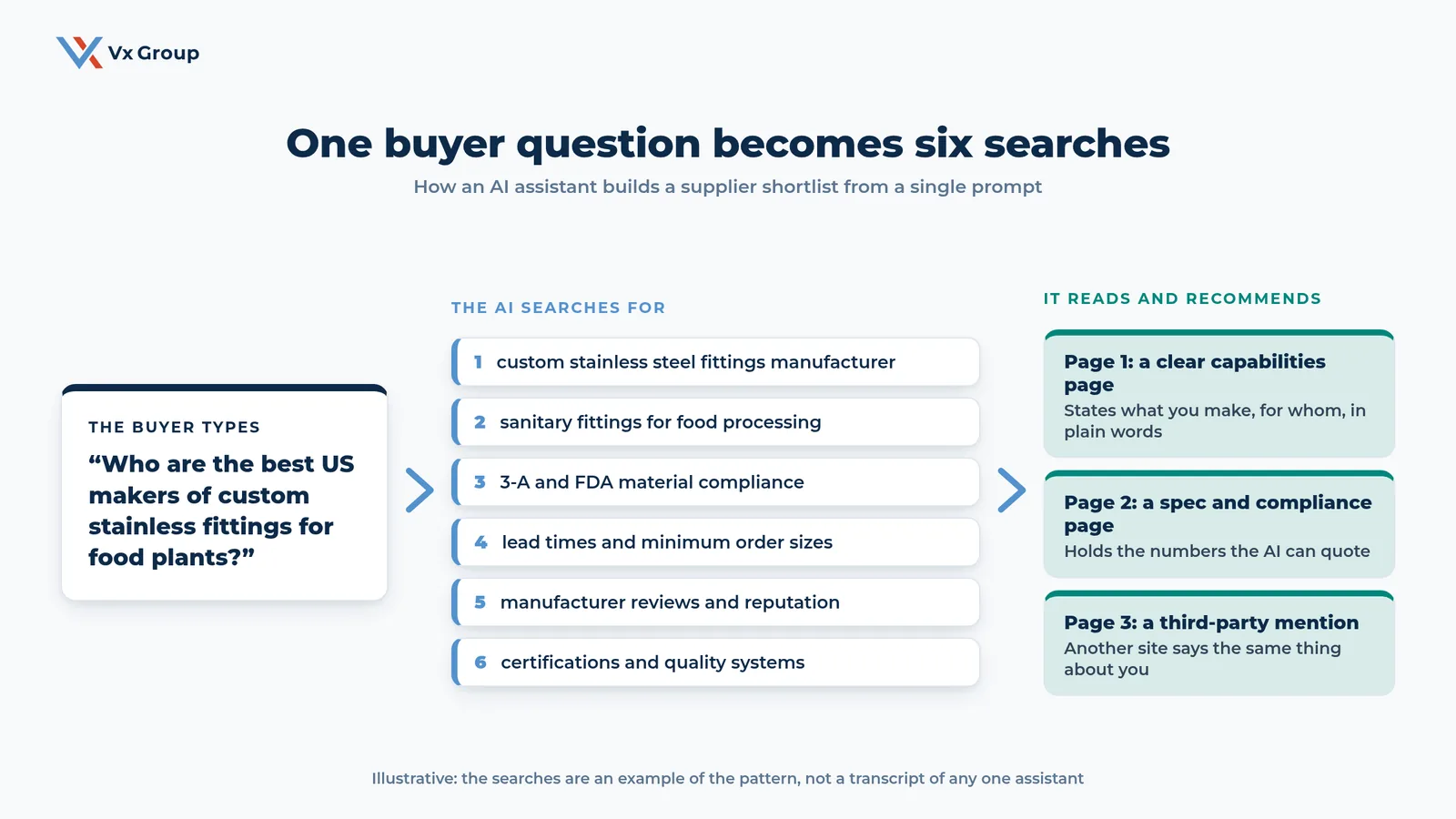
An AI assistant chooses a B2B supplier in three phases: it takes the buyer’s prompt, expands it into several background searches, and reads a small number of pages from the results to write its answer. The pages that are easy to find, easy to understand, and backed by other sources supply the names. Everything else drops out before the buyer sees a response.
The three phases look like this:
| Phase | What happens | What it means for a supplier |
|---|---|---|
| 1. The prompt | The buyer types a plain question, often longer and more specific than a search-box query | Your company has to match how buyers actually phrase the need |
| 2. The fan-out | The AI splits the question into several searches, such as the product, the compliance standard, lead times, and reputation | Each sub-question needs its own answer somewhere on your site |
| 3. The shortlist | The AI reads a few pages, compares what they say, and writes a recommendation | Only pages it can read and trust become part of the answer |
Notice how little of this resembles ranking on page one. A supplier can sit at position eight for a keyword and still be named, because the assistant is looking for the clearest answer to each sub-question. A supplier at position one can be skipped if the page opens with a slogan and keeps its specs in a PDF.
This process is also why generic content has little value. The assistant has already read a hundred pages that say a company is committed to quality. It looks for the page that states which certifications you hold, which materials you work in, and what your minimum order is.
What happens to a buyer’s prompt before the AI answers?
The buyer’s prompt is split into a set of narrower searches, a step often called query fan-out, and each one pulls a handful of pages. A single question about a custom part can turn into six or more searches covering the product, the standard, the lead time, the minimum order, the reputation, and the certifications. Your page has to answer at least one of them better than a competitor’s does.
Defined Term: Query fan-out.
The step where an AI assistant breaks one user question into several related searches, runs them, and combines what it finds into one answer.
The fan-out is the part most suppliers never see, and it changes what you should write. A buyer asks one question. Your site has to hold the answers to the six questions behind it.
Write down the ten prompts your buyers actually type
Open a document and write ten questions a buyer might ask an assistant when looking for a company like yours. Draw them from real sources: the last ten inquiries you received, the questions your sales team hears on first calls, and the emails distributors send when they are qualifying a new line. Write each one the way a person would speak it.
Use this format:
- “Who makes [product] for [industry] in the United States?”
- “Which [product] suppliers meet [standard]?”
- “What is a realistic lead time for custom [product]?”
- “What should I ask a [product] supplier before I sign?”
- “Compare [your company type] with [alternative approach] for [use case].”
Keep the list. It becomes your test set and your content map.
Split each prompt into the six searches behind it
For each of the ten prompts, write the sub-questions the AI would need answered. Use six categories as a checklist:
- The product or capability itself
- The standard, certification, or material spec
- Lead time and minimum order
- Who the supplier serves (industry, size, region)
- What others say about the supplier
- How to compare options
If a category has no clear answer on your site, you have found a gap. A prompt with three or more gaps is one you will rarely win.
Run the prompts and record who gets named
Paste each prompt into at least two assistants. Record, in a simple table, which companies appear, what the assistant says about them, and which sources it cites. Do the same for your own company name: ask the assistant what your company makes and who it serves.
| Prompt | Assistant | Companies named | Were we named? | What it said about us | Sources cited |
|---|---|---|---|---|---|
| (your prompt) | (tool) | (list) | Yes / No | (summary) | (sites) |
The first pass usually turns up two things. Competitors they considered smaller are named, and the description of their own company is thin or slightly wrong. Both findings give you a to-do list.
What are the three tests: visibility, clarity, and corroboration?
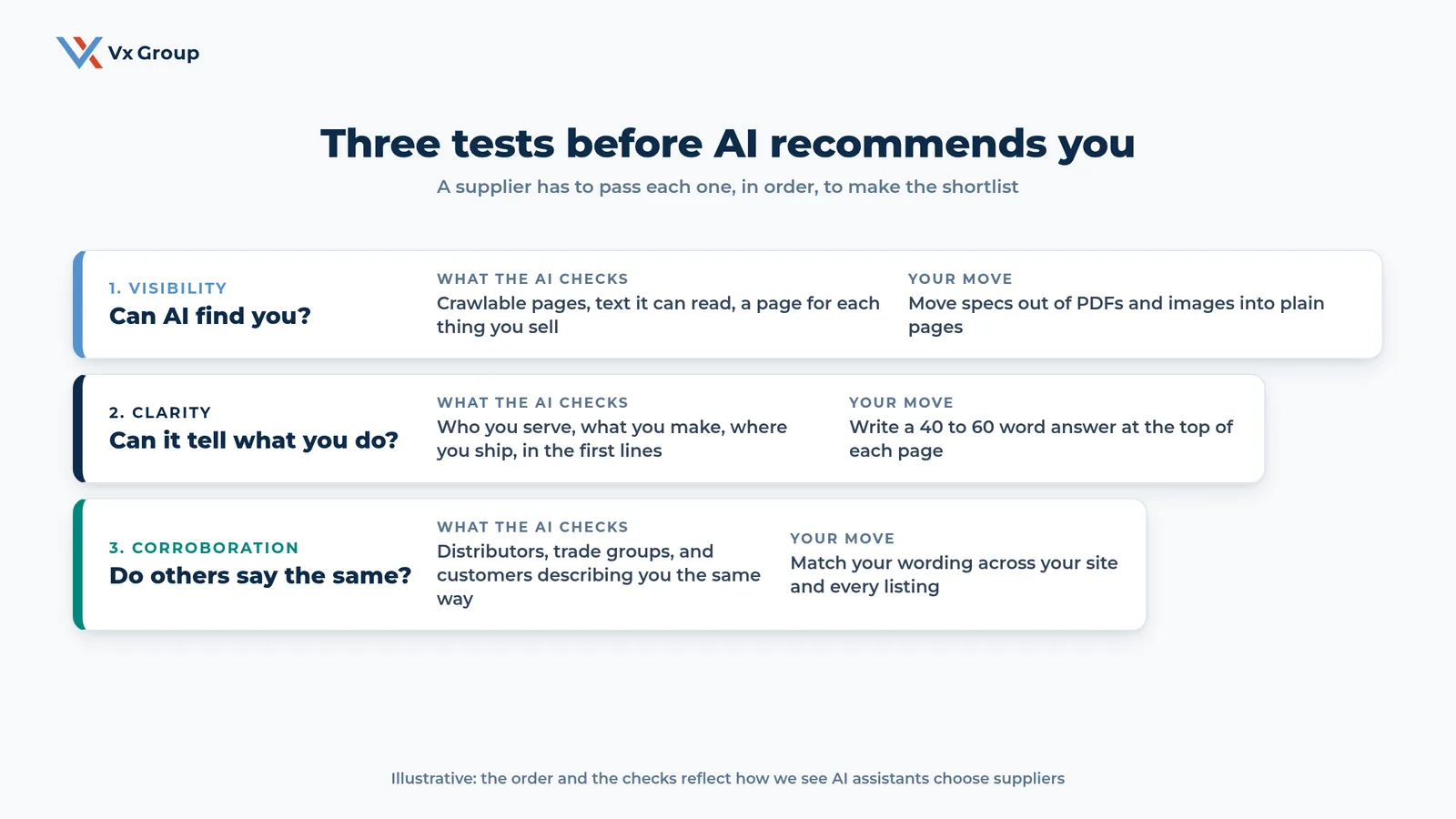
The three tests are visibility (can the AI find your pages), clarity (can it tell exactly what you make, for whom, and where), and corroboration (do other sources describe you the same way). A supplier needs to pass all three, in that order. A failure at any stage removes you from the answer, however strong the later stages are.
| Test | The question | What the AI checks | The usual failure in a manufacturer |
|---|---|---|---|
| Visibility | Can AI find you? | Crawlable pages, readable text, a page for each product or capability | Specs locked in PDFs and images, one catch-all products page |
| Clarity | Can it tell what you do? | Who you serve, what you make, where you ship, stated in the first lines | A homepage built on slogans, with the actual product three clicks deep |
| Corroboration | Do others say the same? | Distributors, trade groups, directories, and customers describing you consistently | Different company descriptions on the site, LinkedIn, and every listing |
Fix visibility by moving specs into plain pages
The most common visibility failure in manufacturing is the PDF catalog. The specs buyers want sit inside a file, or inside images of tables, where an assistant either cannot read them or reads them poorly. Move the content onto web pages as text and real tables.
Use this checklist for each product line:
- One page per product family, with its own URL and a plain title.
- Specifications in an HTML table, with units written out.
- Materials, certifications, and standards listed as text.
- Lead time and minimum order stated, even as a range.
- A short list of the industries you serve.
- The PDF kept as a download, with the same content on the page.
Check that the page loads without a login or a form in front of the content. An assistant cannot fill out a form to see your specs.
Fix clarity by writing the answer into the first lines
A page passes the clarity test when a reader can state what the company does after reading two sentences. Rewrite the opening of each key page to name the product, the customer, the standards, and the region. A line like “Precision solutions for demanding environments” tells an assistant nothing. A line like “We make custom stainless fittings for US food and beverage plants, to 3-A and FDA material requirements” gives it facts it can repeat.
Write each page opening using this pattern:
- What you make
- Who it is for
- The standard or spec that matters
- Where you ship
- One number that gives scale, such as years in business or parts shipped, if it is accurate
Keep the wording identical wherever you can. The AI compares descriptions, and consistent language reads as reliable.
Fix corroboration by matching your story everywhere
Assistants weigh whether independent sources agree. If your site says you make custom stainless fittings and a directory lists you as a general metal fabricator, the picture blurs. Build a one-paragraph company description and use it everywhere you control the text.
Update these places this month:
- Your LinkedIn company page
- Google Business Profile
- Trade association and industry directory listings
- Distributor and rep line cards
- Customer case pages, with the customer’s permission
- Press releases and trade publication bios
Then ask for what you do not control. A distributor who describes your line accurately on their own site helps more than another page of your own copy. Send your best distributors the one-paragraph description and ask them to match it.
Ready to grow?
We help owners find out how AI assistants describe their company today and which pages to fix first.
What does a page look like that an AI can read and quote?
A page an AI can quote has a plain H1 that matches how a buyer asks the question, a 40 to 60 word direct answer at the top, a short summary, headings phrased as questions, defined terms, data in tables, and an FAQ with schema markup. Each section opens with a complete answer, so the assistant can lift one chunk and have a usable statement.
The anatomy below is the structure we use on this blog, and it works for product and capability pages as well.
| Element | What to do | Why the AI uses it |
|---|---|---|
| H1 | Write it as the buyer would ask or name the topic | The AI matches the page to the prompt |
| Direct answer (40 to 60 words) | Answer the H1 in the first paragraph | It is a self-contained chunk the AI can quote |
| TL;DR | Three to six bullets under the answer | A fast summary of the page’s claims |
| Question headings (H2) | Phrase each section as a question and answer it first | Each section maps to one of the fan-out searches |
| Defined terms | Define key terms in a short callout | The AI can reuse a clean definition |
| Tables | Put specs, comparisons, and criteria in tables | Structured facts are easy to extract and compare |
| FAQ with schema | Add real questions with short answers and FAQ markup | It matches the way people phrase follow-ups |
Type the H1 the way a buyer would say it
Use one H1 per page. Name the product and the use, in plain words. “Custom Stainless Fittings for Food Plants” gives the AI a match. “Our Capabilities” gives it nothing. Check every key page: could a stranger tell from the H1 alone what the page covers?
Write the 40 to 60 word direct answer
Directly under the H1, write a short paragraph that answers the question the page exists to answer. State the product, the customer, the standard, and the main differentiator. Read it aloud. If it would work as a spoken answer to a buyer on the phone, it will work as a quote for an assistant.
Turn your section headings into questions
Replace label headings such as “Overview” and “Specifications” with the question a buyer would ask: “What materials do you work in?” and “What is your minimum order?” Put the answer in the first sentence under the heading. This lets one section stand alone when an assistant pulls it out.
Define your terms once and plainly
Every industry has terms an outsider will misread. Add a short definition for the two or three that matter on the page, such as a spec grade, a process, or a certification. A clear definition is easy for an assistant to reuse, and it saves your buyer a search.
Put the data in tables
Tables carry weight with answer engines because the facts sit in labeled cells. Use them for specifications, material options, certifications by plant, lead times by order size, and comparisons between product lines. Keep the column names plain and put units in the header.
Add an FAQ with schema
Write four to six real questions, drawn from your prompt list and your sales calls. Answer each in two or three sentences that stand alone. Mark them up with FAQ schema so machines can read the question and answer pairs directly. Your developer or SEO plugin can add it, and it is a one-time job per page.
For manufacturers rebuilding pages from scratch, our guide to a B2B website redesign covers what to fix before changing how the site looks, and the piece on industrial content marketing covers how to build the supporting content.
How is LLM SEO different from the SEO you already do?
LLM SEO builds on traditional SEO and shares its base: crawlable pages, clear titles, fast loading, and useful content. The unit of competition changes. A results page ranks ten or more links, and an assistant answer names perhaps three suppliers, so the goal becomes being one of the few sources it reads and names.
| Area | Traditional SEO | LLM SEO |
|---|---|---|
| Goal | Rank high for a keyword | Be named in the answer to a question |
| Query | Short keyword phrase | Long, specific, conversational prompt |
| Unit of work | A page targeting a keyword | A set of pages answering the sub-questions behind a prompt |
| What wins | Relevance, links, authority | Clarity, extractable answers, agreement across sources |
| How you measure | Rankings, traffic | Whether you are named, how you are described, which sources are cited |
Both depend on the same base work. A site that loads slowly or hides its content from crawlers fails both. The companies that already invest in clear service pages, accurate listings, and useful guides have a head start, and the gap in AI answers tends to be in specifics: stated specs, plain first lines, and consistent descriptions.
One practical consequence is that keyword repetition adds nothing. Stuffing a page with a product term makes it harder to read, and the assistant reads for meaning. Put the effort into stating facts once, clearly, where a buyer or an assistant will look.
The wider shift is covered in our pieces on AI in sales and AI for manufacturing. Both look at what AI changes inside a relationship-driven company. This guide looks at what it changes in how buyers find you.
Field Notes:
An owner of a $20 million custom components manufacturer (a composite of patterns we see, with details changed) ran ten buyer prompts and found his company named in one. A smaller competitor appeared in seven. His website was well designed and ranked reasonably for his main product term. The difference was in the pages. His competitor had a page for each material with a spec table and a stated lead time. His own site had a single products page with a catalog PDF. He moved the PDF content onto eight product pages over six weeks, rewrote the first two lines of each, and matched the company description across his listings. Two months later he ran the same ten prompts and appeared in five.
How do buyer prompts differ by role?
Each person on the buying side asks an assistant a different kind of question, so one page rarely covers them all. An engineer asks about specs and standards, a purchasing manager asks about price drivers and supplier risk, an owner asks who is reputable, and a distributor asks about margin and support. Map your pages to these four voices.
| Role | A prompt they might type | What the page needs to state |
|---|---|---|
| Engineer | “Which suppliers make [part] to [standard] in [material]?” | Specs, tolerances, materials, and certifications in a table |
| Purchasing manager | “What affects lead time and cost on custom [part]?” | Lead-time ranges, minimum orders, and what moves the price |
| Owner or president | “Who are the established US makers of [product]?” | Years in business, plants, customers served, and third-party mentions |
| Distributor | “Which manufacturers of [product] are looking for distributors?” | Territory, margin structure, training, and support for partners |
The same company can need four pages for one product line. That sounds like a lot of work until you notice that most of the content already exists in your sales team’s heads, your quote templates, and your distributor onboarding documents. Pull it onto the site in the voice of the person asking.
Our guide to lead generation for manufacturers covers how these inquiries turn into conversations once a buyer reaches you.
What mistakes keep suppliers off the AI shortlist?
Four mistakes show up most often: locking specs in PDFs, opening pages with slogans, describing the company differently in each place it appears, and writing for a keyword when the buyer asked a question. Each is easy to find in the first round of the ten-prompt check, and the full list is below.
- Specs in PDFs and images. The assistant cannot rely on them. Put the content on the page as text and tables.
- Slogans in the first line. “Engineered for excellence” tells a reader nothing. State what you make and for whom.
- One page for everything. A single products page cannot answer six sub-questions. Give each product family a page.
- Inconsistent descriptions. Different wording on the website, LinkedIn, and directories blurs your identity. Use one paragraph everywhere.
- No proof the AI can find. Customer names, certifications, and case results kept in sales decks stay invisible. Publish what you have permission to share.
- Writing for keywords. A repeated phrase answers nothing. Write the answer.
- Hiding behind a form. Content that needs an email address to view is content the AI cannot read.
- Checking once. Assistants change. Rerun the ten prompts every quarter and log the results.
- Treating it as a marketing-only project. Your sales team knows the questions buyers ask. Pull them into the prompt list.
- Skipping the people side. The assistant gets you onto the shortlist. A buyer still picks the supplier they trust, which is why relationships close the deal. Our guide to the B2B buying committee covers the people you meet after the shortlist forms.
Where should an owner start this month?
Start with your three most profitable product lines. For each, run the ten-prompt check, then fix the one page that matters most: put the specs on the page as text and tables, rewrite the first two lines to state what you make and for whom, and match the company description across your listings. Existing staff can usually finish this in about a month.
Use this four-week plan:
| Week | Task | Output |
|---|---|---|
| 1 | Write ten buyer prompts and run them in two assistants | A results table showing who is named and how you are described |
| 2 | Rebuild the page for your most profitable product line | A text-and-table page with a plain H1, direct answer, and FAQ |
| 3 | Write the one-paragraph company description and update every listing | Consistent wording on LinkedIn, directories, and distributor pages |
| 4 | Ask three distributors or customers to describe you accurately, then rerun the prompts | A second results table to compare with week one |
Keep the results table. It is the only scoreboard for this work, and it shows within a quarter whether the changes are moving you onto the shortlist.
If you want a second opinion on how AI assistants describe your company today, we are glad to look at the results with you.
Ready to grow?
Bring your ten prompts and we will review who gets named, how your company is described, and which three pages to fix first.
FAQs
About the Author: David Tisdale
