

How to Run an AI Visibility Audit on Your Company in 10 Minutes

An AI visibility audit is a short test of what AI assistants say about your company and where they found it. Ask ChatGPT what it knows about your company and ask it to show its sources. Then check whether your reviews, case studies, trade press, associations, distributors, and directories tell the same story as your website. Repeat the test every month.
TL;DR
- An AI visibility audit takes about 10 minutes. Ask one question, read the answer against a short checklist, and compare seven outside sources to your website.
- The question is: “What do you know about [your company]? Show me your sources.” The sources it names show where AI learned about you.
- AI assistants build their answer from many places at once. The most common reason an answer comes out wrong is a conflict between your site and a distributor page, a directory, or an old trade article.
- Fix conflicts first, then missing listings, then out-of-date pages. Each fix is a small edit you can hand to one person.
- Repeat the test every month and add three tracking checks. Look at AI referrals in GA4, new conversational queries in Search Console, and a “how did you find us” field in your CRM.
- A paid AI visibility checker is optional. A manual audit tells an owner-led manufacturer everything it needs to start.
A private equity group that became a Vx Group lead told us it found us by running a deep-research query in Claude. Nobody referred them and nobody clicked an ad. An AI assistant read what exists about us across the internet, formed an opinion, and put us on a short list.
That happens to your company too, whether or not you have looked. Buyers, investors, and job candidates now ask an assistant about a company before they call it. The assistant answers from whatever it can find. It sounds sure of itself even when the material is thin or out of date.
Most owners have never read that answer. This guide shows you how to read it in about 10 minutes. It shows you how to check whether the sources behind it agree with each other, and how to keep checking every month. It uses free tools and no special software.
What is an AI visibility audit?
An AI visibility audit is a check you can repeat. It shows how AI assistants describe your company, which sources they use, and whether those sources agree. The result is a one-page list of what is right, what is wrong, and what is missing.
The audit looks at your company from the outside. It starts with the assistant’s answer. Then it works back to the pages and listings that produced that answer. Start there because the answer is what a buyer actually sees.
Defined Term: AI visibility audit.
A short test you can repeat. You ask an AI assistant to describe your company and name its sources. Then you compare the answer and the sources to your own website and the outside sites that mention you. The result is a list of corrections, ordered by how much damage each one does.
Getting named for buyer questions is bigger work, and it has its own guide. Our guide to how to rank in ChatGPT covers the seven-step build, including a ten-prompt scorecard of buyer questions. The audit here is the quick first look that tells you where to begin.
Why does an AI visibility audit matter for an owner-led manufacturer?
Buyers now use AI for their first round of research. The assistant’s description of your company is often their first impression. A manufacturer with 20-year customers can still be described as a small shop, a distributor, or a company that closed, if the sources say so.
Three things make the audit worth ten minutes of an owner’s week:
- The assistant reads what the whole internet says about you. Your website is one voice. Reviews, distributor pages, trade articles, association listings, and directories all speak too. The assistant weighs them together.
- Mistakes repeat. An old address, a retired product line, or a wrong certification gets copied from listing to listing. One bad source can show up in every answer.
- The buying committee uses it. Our guide to the B2B buying committee lists the roles that review a deal. Several of them will ask an assistant about you before they ever speak to your team.
For the bigger picture of how AI finds and compares suppliers, read our guide to LLM SEO. This article gives you the test to run before you read it.
Step 1: How do you ask AI what it knows about your company?
Open an AI assistant, ask what it knows about your company, and ask it to show its sources. This step takes about two minutes and uses one sentence.
Open a fresh session
Use a new chat. Use a temporary or logged-out chat if the assistant offers one. A long chat history or saved memory can change the answer, and you want the answer a stranger would get.
Type the one-sentence prompt
Use this wording and fill in your details:
What do you know about [company name], a [type of manufacturer] based in [city, state]? Show me your sources.
Include the city and your business type. Many companies share a name with another company. The location keeps the assistant from describing the wrong one.
Ask for the sources in the same message
The words “Show me your sources” do most of the work. An assistant that browses the web will usually list the pages it used. Those pages are your starting list. If it names no sources, ask again: “Which websites did you use for each claim?”
Save the answer word for word
Paste the full answer into a document and put today’s date at the top. Next month you can compare the new answer to this one and see what changed.
Run the same prompt in two or three assistants if you can. Each assistant pulls from different places. If two of them disagree, one of the sources is worth checking.
Step 2: How do you read the answer?
Read the answer against five checks. Mark each one right, wrong, or missing. This takes about three minutes and gives you the first half of your fix list.
Use this table as the checklist:
| Check | What to look for | A bad result looks like |
|---|---|---|
| Is it you? | The right company, city, and industry | A different company with a similar name |
| Is it right? | Products, services, markets, certifications | A retired product line or a service you never offered |
| Is it current? | Locations, leadership, size, recent work | An old address or a former owner |
| Is it complete? | Your strongest capabilities and customers | A generic line such as “manufactures industrial parts” |
| Is it sourced? | The pages the assistant named | No sources, or sources you do not recognize |
Mark every wrong claim with its source
For each wrong or outdated claim, write down the page it came from. A wrong claim with a named source is a ten-minute fix. A wrong claim with no named source needs a second prompt. Sometimes it needs a search for the exact phrase.
Circle what is missing
Compare the answer to the three things you would want a new customer to know. Say your 25 years of work for aerospace buyers never shows up. That gap matters as much as an error.
Note the sources you do not recognize
If an unfamiliar site describes your company, go look at it. Directories and aggregator pages often copy a profile once and never update it. Add every such site to the list for Step 3.
Step 3: How do you check whether your outside sources say the same thing?
Compare what each outside source says about you to what your website says. Use one sheet with one row per source. This is the longest step, about four minutes. It finds the problems behind most wrong answers.
An assistant builds its description by cross-checking sources. Say your site says one thing and a distributor page says another. The assistant has to pick one. It may pick the wrong one or blend the two.
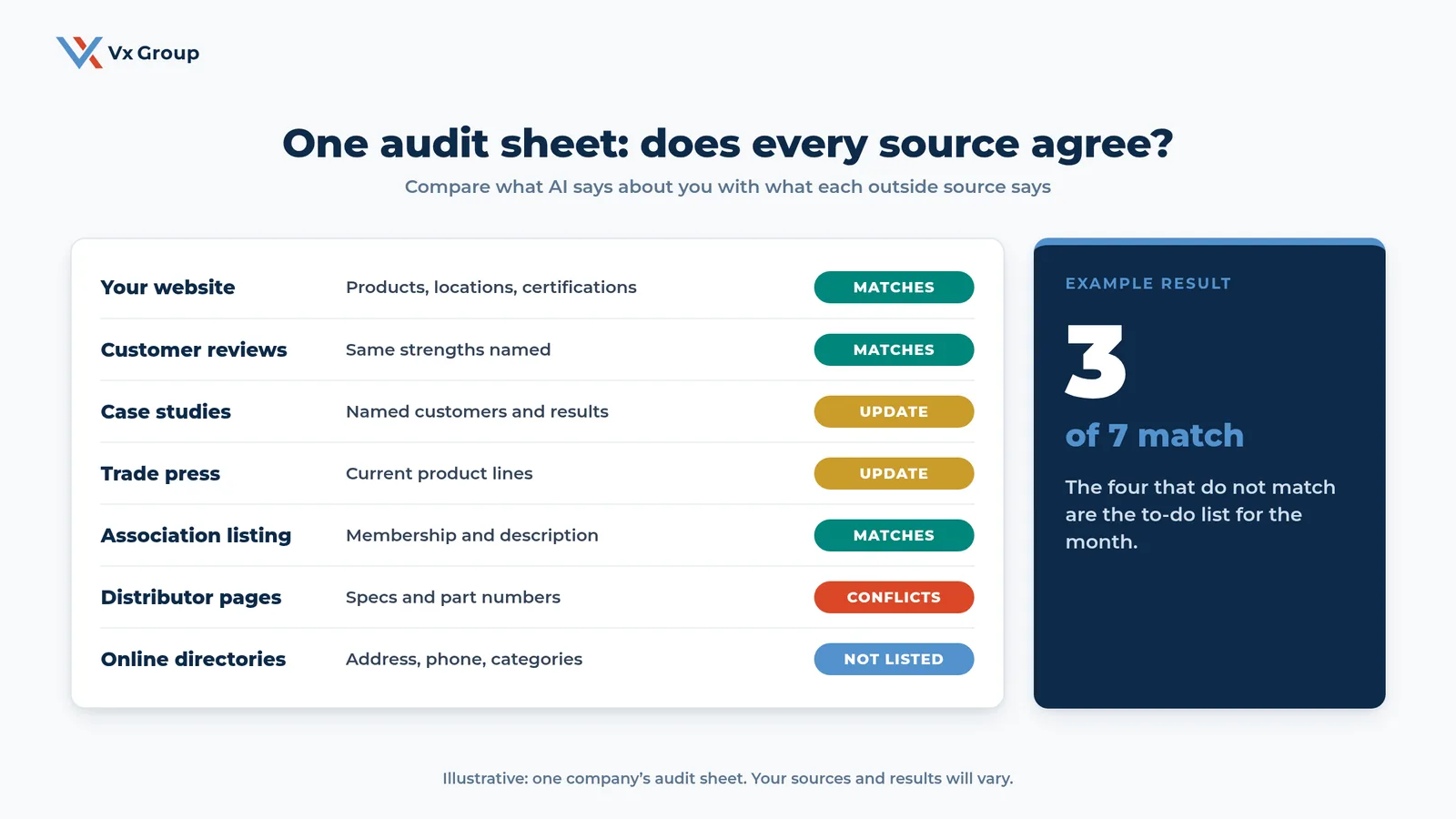
Go through each source type below. Mark it as matches, needs an update, conflicts, or not listed.
Check your customer reviews
Search your company name with “reviews” and read what customers say. Note the strengths they name, such as on-time delivery, fast replies, or quality. Your site should claim the same strengths. Say reviews praise your service and your site talks only about equipment. Then the assistant sees two different companies.
Check your case studies and customer stories
Open your case studies and check the facts: customer names, results, dates, and the products involved. Old stories can describe a process or product you no longer offer. They keep circulating long after you stop using it.
Check trade press and articles
Search your company name in quotes along with the trade publications your buyers read. Articles from several years ago still describe you today. Note any that give old product lines, old leadership, or old locations.
Check your association and industry listings
Look at your listing in each association, chamber, or standards body you belong to. An assistant can read membership pages. They are often the pages updated least.
Check your distributor and rep pages
Look at how your distributors and sales reps describe your products. These pages often hold outdated specs, wrong part numbers, or a discontinued line. They are the source most likely to conflict with your site. Our guide to PDF SEO explains why old catalogs travel through these channels and keep contradicting your current pages.
Check your online directories
Search your name, address, and phone number in the business directories your buyers use. Mark each listing as matching, wrong, or missing. A missing listing means the assistant has fewer sources that confirm you exist and what you do.
When you finish, count the rows. If any row shows a conflict, deal with it this week. If you only have updates, they can wait for the month.
Ready to grow?
Bring your audit sheet and we will help you decide which corrections come first.
Step 4: How do you fix the gaps you found?
Fix the gaps in this order: conflicts, then missing listings, then out-of-date pages, then the missing strengths. Conflicts come first because they give the assistant two different answers.
Give every fix an owner and a date. Most fixes take under an hour. A list nobody owns will sit untouched.
Write a one-page company fact sheet
Put the correct facts on one page: legal name, address, year founded, products, markets, certifications with numbers, and two or three named customers who allow a reference. Every correction below pulls from this page, so write it first.
Send corrections to distributors and directories with the fact sheet
Email each distributor that has a wrong page. Attach the fact sheet and ask for an update by a specific date. Update your own directory listings the same day. Keep a log of who you asked and when. Follow-up is where this work usually stalls.
Update your own pages to say the same thing
Check that your website, your LinkedIn page, and your sales documents all match the fact sheet word for word on the basics. Our guide to SEO for manufacturing companies covers what your site needs to state in plain text so an assistant can read it.
Add the strength that was missing from the answer
For each strength the assistant left out, publish one plain page or paragraph that states it with a fact: a number, a customer, a certification, a year. A claim with a fact attached gives an assistant something to quote. This is one reason keyword stuffing now hurts in AI search.
Step 5: How do you test a few buyer questions?
Finish the audit with three extra prompts a buyer might type. Record whether your company appears. This takes about a minute. It shows you whether the assistant describes you correctly and whether it recommends you.
Use these three prompts and adapt them to your market:
- “Who makes [your product] in [your region]?”
- “What should I look for in a supplier of [your product]?”
- “Compare [your company] with [your closest competitor].”
Note whether you appear, how you are described, and which competitors appear beside you. Our guide to how to rank in ChatGPT walks through the full set of ten prompts and a scoring method.
How do the 10 minutes break down?
The audit fits in 10 minutes when you work from a prepared sheet and treat the fixes as a separate task. The times below are a guide. Your first run will take longer than later ones.
| Minutes | Step | What you produce |
|---|---|---|
| 0 to 2 | Ask the question and save the answer | A dated copy of the answer and its sources |
| 2 to 5 | Read the answer against the five checks | Marked right, wrong, and missing claims |
| 5 to 9 | Compare seven outside sources | A filled audit sheet |
| 9 to 10 | Run three buyer prompts | A note on whether you appear |
| After | Fix the gaps | An owner and a date for every correction |
Treat the first run as a baseline. After that, you only look for changes. That is much faster than a first read.
Step 6: How do you track AI traffic in Google Analytics 4?
Open your Google Analytics 4 traffic acquisition report, change the view to session source, and look for visits from AI assistants. This shows whether the assistants’ answers send anyone to your site.
Open the traffic acquisition report
In GA4, go to Reports, then Acquisition, then Traffic acquisition. Change the dimension to Session source / medium.
Search for the assistants by name
Use the search box to look for names such as chatgpt, perplexity, gemini, claude, and copilot. Source names change over time. Scan the full list once for anything you do not recognize. ChatGPT, for example, tags the links it sends with its own name.
Look at the landing pages
Click into a source to see which pages those visitors landed on. If AI visitors land on your spec pages and case studies, those are the pages the assistants trust. If they land on your homepage, the assistant has little else to point to.
Remember that some visits will look like direct traffic
Some AI visits arrive with no source attached, and GA4 files them under Direct. Treat the AI numbers you see as a minimum. Watch the trend, since the count will run low.
Step 7: How do you watch new queries in Search Console?
Open the Search Console performance report and look for longer, conversational queries. They show buyers asking questions the way they would ask an assistant. Search Console does not show AI answers as a separate line, so you are watching for a pattern.
Filter for long queries
In the Performance report, add a Query filter, choose Custom (regex), and enter `([^ ]* ){7,}`. This shows queries of eight words or more. Sort by impressions and compare to last month.
Save the questions you did not expect
Copy any query that sounds like a full buyer question: a specific part, a spec, a region, a comparison. Each one is a page you could write or a section you could add.
Match each query to a page
For every saved query, name the page on your site that answers it. If none does, add it to your content list. If one does, check that the answer comes first on the page, in plain text.
Step 8: How do you ask every lead how they found you?
Add one question to your first call and log the answer word for word in your CRM. Analytics tools miss many AI-assisted discoveries. What the buyer tells you fills that gap.
Add a "how did you find us" field
Create a free-text field on your lead or opportunity record. Use free text because a list of options hides the answers you did not expect. If your CRM sits half empty, our guide to CRM adoption covers how to fix that first.
Ask the question in the same words every time
Use something like: “How did you first hear about us?” Then follow with: “Did you use an AI tool like ChatGPT or Claude while you were looking?” Keep the follow-up neutral so the answer stays honest.
Read the answers at your monthly review
Once a month, read the whole column. Count how many leads mention AI, a referral, a trade show, or a search. No dashboard gives you that count.
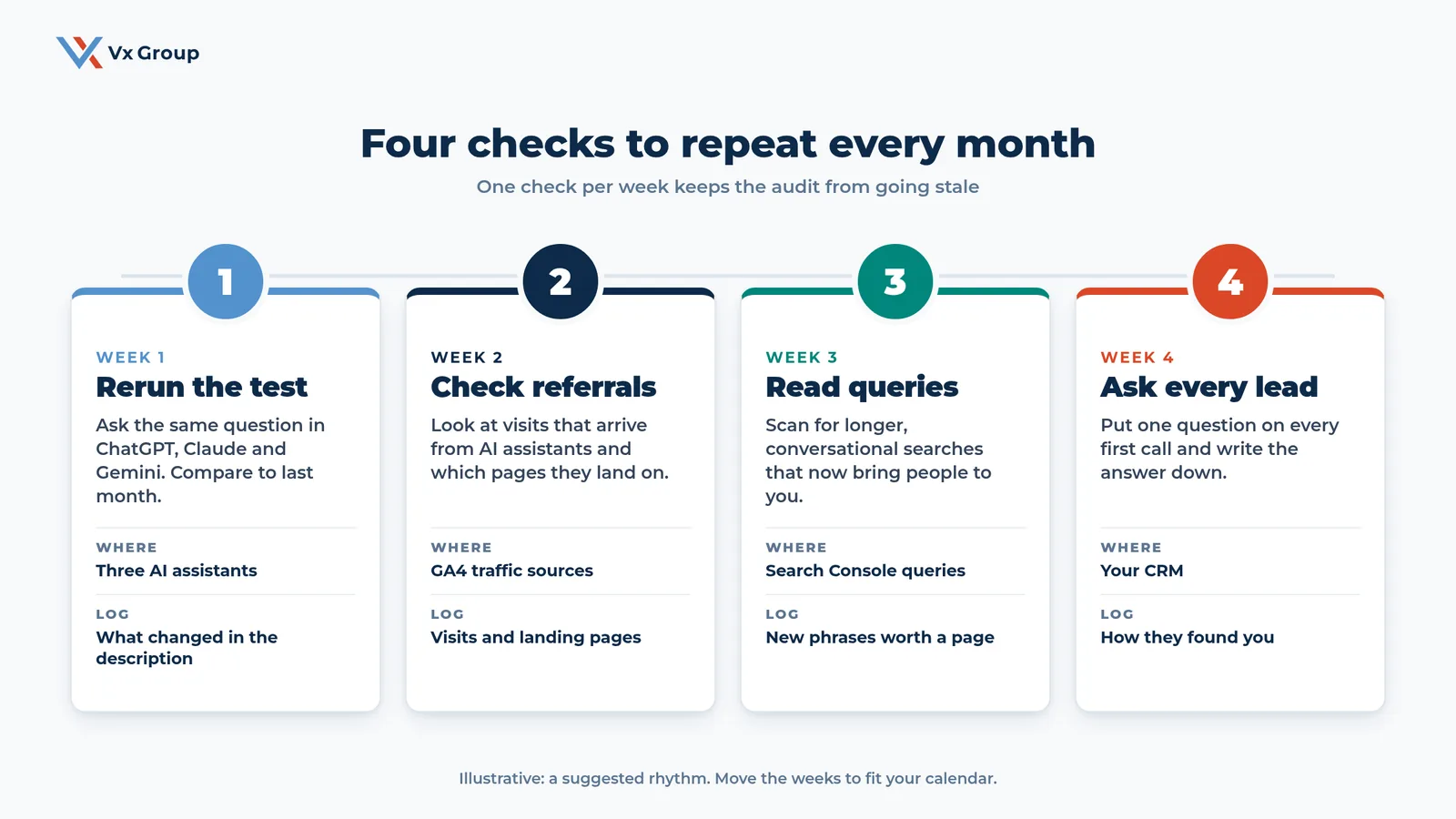
What does a monthly AI visibility routine look like?
A monthly routine is four checks, one per week: rerun the test, check AI referrals, read new queries, and ask every lead. The whole routine takes about an hour across the month.
| Week | Check | Where you look | What you log |
|---|---|---|---|
| 1 | Rerun the Step 1 question in two or three assistants | The AI assistants | What changed in the description |
| 2 | Check visits from AI assistants | GA4 traffic acquisition | Visits and landing pages |
| 3 | Read long, conversational queries | Search Console | New phrases worth a page |
| 4 | Read how leads said they found you | Your CRM | Count of leads that mention AI |
Pick one person to own the routine and put the four checks on their calendar. If the audit depends on the owner remembering it, it will lapse by the second month.
Keep the log in one shared document with a line per month. After a quarter you will see a trend. The assistant may drop an old product line, or a new directory entry may show up in the sources.
Do you need a paid AI visibility checker?
You do not need a paid tool to start. A tool becomes useful once your list of prompts grows past what one person can run by hand. A manual audit teaches you what to look for, and that makes any tool easier to judge.
Paid checkers run a long list of prompts on a schedule and chart how often your company appears. That helps a company with many product lines and many competitors. An owner-led manufacturer with a few core lines gets most of the same information from ten prompts run by hand each month.
If you do buy a tool, test it against your own audit first. Check that its description of your company matches what you saw by hand. Check that it shows sources you can open.
What mistakes make an AI visibility audit useless?
An audit loses its value when you run it once, run it with a logged-in history, or run it without a fix list. These are the mistakes we see most often:
- Testing with your own chat history. The assistant knows you. A stranger’s answer will differ.
- Skipping the sources. An answer without its sources tells you what is wrong and gives you nowhere to fix it.
- Auditing only your own site. Your website is one source out of many, and it is often the most accurate.
- Fixing the easy items first. Conflicts do the most damage and take the most chasing, so start there.
- Running it once. A single run is a snapshot. The value comes from comparing months.
- Giving the fixes to no one. Each correction needs an owner and a date.
- Treating one assistant as the whole picture. Run at least two, since they draw on different sources.
Where should an owner start today?
Run Step 1 before you log off today. Open a fresh chat and paste the one-sentence prompt with your company details. Save the answer in a document with the date.
Then read it against the five checks in Step 2 and write down the three biggest problems. That starts your fix list, and it takes about five minutes. Hand the list to the person who owns your website, and schedule Step 3 for tomorrow.
If you want a second set of eyes on what you find, we run a 30-minute AI visibility review for owner-led manufacturers. We look at your answer, your sources, and your first three fixes. To see where your company stands on AI overall, read our 6-step AI readiness assessment next. SEO vs AEO explains what changes and what keeps working.
Ready to grow?
Book a 30-minute AI visibility review and we will read the answer AI gives about your company and mark the first three fixes with you.
FAQs
About the Author: Jacob Camhi
