

SEO for Manufacturing Companies: What AI Needs From Your Website

SEO for manufacturing companies is the work of making your website answer the exact questions buyers ask, in the exact details they use. Google still ranks your pages. A buyer’s AI assistant now reads them first and compares your details against the buyer’s request. A page that states material, tolerance, volume, certification, and location gives it something to match.
TL;DR
- Buyers paste their full request into an AI assistant, and the assistant checks each detail against your pages. A generic capabilities line matches almost none of them.
- A sample line, “Quality precision machining for a wide range of industries,” matches 0 of 6 details in a typical buyer prompt. A spec line naming the material, part, tolerance, run size, certification, and city matches 6 of 6.
- Six details belong on every capability page: material, part or product, tolerance or range, run size, certification, and location.
- Before writing anything, sort every topic into Build (no page exists), Rebuild (a page exists and ranks poorly), or Optimize (the page ranks and gets few clicks).
- Anonymized audit numbers show each case: 5,610 monthly searches with 0 pages, a crates page at position 35, and 97,455 impressions that produced 53 clicks.
- Technical basics still matter: crawlable text, AI crawlers allowed in, specs outside locked PDFs, and one page per product family.
- Start with your top three product lines and one quarter of work. Check the result by running real buyer prompts, because AI answers do not appear in your analytics.
In this guide
- What SEO for manufacturing companies means now
- How AI decides whether your website fits a buyer’s request
- The six details every manufacturing page should state
- The pages a manufacturer’s website needs
- How to decide between Build, Rebuild, and Optimize
- What to fix first on a page that already exists
- The technical basics manufacturers miss
- Who does the work and how long it takes
- How to measure whether it is working
- Mistakes to avoid and where to start
Most manufacturing websites describe the company the way a brochure does. “Quality precision machining for a wide range of industries” sounds fine to the owner who wrote it. A buyer who needs titanium brackets held to a specific tolerance, in a run of 200, from a shop with aerospace certification, reads that line and learns nothing about any of it.
An AI assistant reads it the same way. It does not give your company credit for what it cannot find written down. The cost is quiet, because the buyer who never saw your name never shows up in your reports.
This guide is for owners and sales leaders of $5 million to $50 million manufacturers. It covers what an AI assistant needs to see on your site, which pages to build first, and how to decide whether a page needs a rewrite or a small fix. Our guide to LLM SEO explains how an assistant turns one prompt into several searches. This guide picks up at your website and what is on it.
What is SEO for manufacturing companies?
SEO for manufacturing companies is the practice of making your website easy for search engines and AI assistants to find, read, and match to what an industrial buyer is asking for. It covers the pages you publish, the details they state, and the technical setup that lets crawlers read them. Its target is the engineer, buyer, or owner searching for a supplier.
Defined Term: Manufacturing SEO.
The work of structuring a manufacturer’s website so that search engines and AI assistants can find each product line and capability, read the specifications on the page, and match them to a buyer’s request.
Three terms show up near this topic, and they overlap:
| Term | What it covers | Where this guide sits |
|---|---|---|
| SEO | Earning a position in search results for the phrases buyers type | The base of the work |
| AEO and LLM SEO | Being quoted or named in an AI assistant’s answer | The part that changed in the last two years |
| Industrial SEO | The same work applied to product, capability, and spec pages | The name used by most agencies for this topic |
The broader keyword and cluster planning work is covered in our guide to B2B SEO strategy. This guide narrows to the manufacturer’s own pages and the question of what an AI assistant needs from them.
One note on demand. Semrush lists “seo for manufacturing companies” at about 1,900 searches a month in the US, and its 12-month trend sits near a fifth of its peak in recent months. That decline may reflect buyers moving their questions into AI assistants. It argues for judging your results by whether you appear in those answers, as well as by traffic.
How does AI decide whether your website fits a buyer's request?
An AI assistant compares the details in a buyer’s request against the details written on your pages and favors the pages that match the most of them. A request that names a material, a part, a tolerance, a run size, a certification, and a location gives the assistant six things to check. A page that states all six gets a full match. A page that states none gets passed over.
Defined Term: Detail match.
The number of specific facts in a buyer’s request that a page states in plain text. A page that matches more of the buyer’s details is more likely to be read, quoted, and recommended.
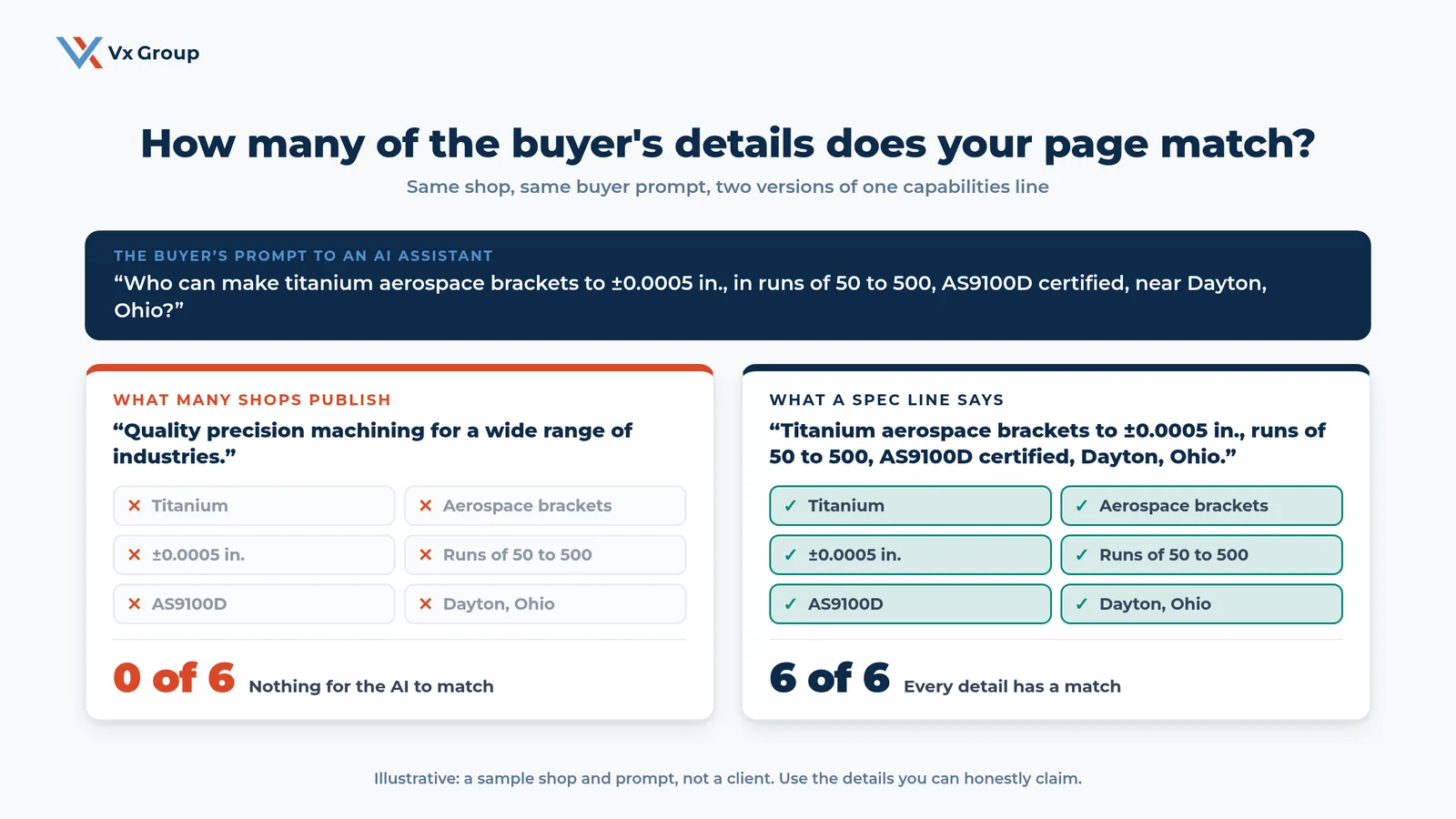
The sample above uses a made-up shop and a made-up prompt, so you can see the mechanics. The buyer asks for titanium aerospace brackets to ±0.0005 inches, in runs of 50 to 500, from an AS9100D certified shop near Dayton, Ohio. The generic line matches none of the six details. The spec line, which names all six, matches every one.
The assistant does not need your company to be the biggest or the best known. It needs a page that says the thing the buyer asked about. A small shop with a precise line can outrank a large one with a polished slogan, because the precise line gives the assistant facts to repeat.
Write the buyer's prompt the way the buyer would type it
Open a document and write the request your best-fit buyer would send an assistant. Use real language from your last five quotes and the first calls your sales team took. Include every detail a buyer cares about: what is being made, from what, to what tolerance, how many, to which standard, and from where.
Use this template:
- “Who can make [part] in [material] to [tolerance], in runs of [quantity], with [certification], near [region]?”
Write three versions for each of your top product lines. The buyers on those prompts are the ones you most want to find you.
Count the details your current page answers
Open the page that should answer each prompt. Highlight every detail from the prompt that the page states in plain text. Count the highlights and write the score beside the prompt, for example 2 of 6.
Count only what a reader can see in the text. A tolerance that appears inside a PDF or in an image of a table does not count, and neither does a certification that appears only in a logo graphic. Those are details the assistant may never read.
Rewrite the line until it matches every detail you can honestly claim
Write one sentence for each page that states the details in the order a buyer asks for them. Keep every claim true. If you hold AS9100D certification, say so with the revision letter. If your tolerance depends on the part, state the range you hold as standard and the tighter figure you can hold on request.
Check the finished line by reading it aloud to someone in sales. If they could answer a buyer’s first phone question from it, the line is ready.
Which six details should every manufacturing page state?
Every manufacturing page should state six details: the material, the part or product, the tolerance or range, the run size, the certification, and the location. Buyers include these in nearly every request, and each one is a fact an assistant can match. A page that states five and leaves one out gives a competitor the opening.
| Detail | What to write | Example |
|---|---|---|
| Material | Name the alloys, resins, or grades you work in | Titanium, 304 stainless, glass-filled nylon |
| Part or product | Name what you make, with the buyer’s word for it | Aerospace brackets, hydraulic manifolds, shipping crates |
| Tolerance or range | State the standard figure and the tightest you hold | ±0.0005 in.; sizes from 2 in. to 48 in. |
| Run size | State your minimum, your typical run, and your ceiling | Runs of 50 to 500 |
| Certification | Name the standard with its revision or class | AS9100D, ISO 9001:2015, ITAR registered |
| Location | Name the city, the state, and the region you ship to | Dayton, Ohio; ships to the US and Canada |
Name the part in the words your buyer uses
Your shop may call a part by its drawing number or a product family code. Your buyer types what the part does or what it is called in their industry. Put both on the page: the buyer’s term as the heading and your internal name in the body. Ask three customers what they call your top product, and use the most common answer.
State the edges of what you do
Buyers filter by limits. State your smallest and largest part, your minimum order, and the lead time for a typical run. A range such as “lead times of four to six weeks on runs of 50 to 500” gives the assistant a usable fact. A page that hides these numbers forces the buyer to call to find out, and many will call someone else.
Write the certification with its exact name
“Certified” says nothing to a machine and little to a buyer. Write the standard, the revision, and the scope: “AS9100D certified for machining and finishing at our Dayton plant.” If the certificate is public, link to it. If you are working toward one, say so, and say when you expect it.
Put the location where a buyer would look for it
Location answers both the “near me” question and the shipping question. Put the city and state in the first paragraph of each capability page and in the footer. List the regions or industries you ship to. Match this text to your Google Business Profile and your directory listings, because the assistant checks whether they agree.
Ready to grow?
We can score your top three pages against real buyer prompts and show you which details are missing.
Which pages does a manufacturer's website need?
A manufacturer’s website needs one page for each combination a buyer searches for: each process or product family, each material you work in, each industry you serve, and each certification you hold. A single capabilities page that lists all of them gives an assistant one weak match for hundreds of requests. A page per combination gives it a strong match for each.
| Page type | Buyer request it answers | One thing it must state |
|---|---|---|
| Product or process page | “Who makes [product] or does [process]?” | Part, material, tolerance, and run size |
| Material page | “Who works in [material]?” | The grades you hold and the parts you make from them |
| Industry page | “Who serves [industry]?” | The standards and customers in that industry |
| Certification page | “Who is certified to [standard]?” | The standard, revision, scope, and plant |
| Location page | “Who is near [region]?” | Address, service area, and shipping reach |
| Distributor or partner page | “Who sells [product] through distributors?” | Territory, support, and how to apply |
Build a page inventory in one spreadsheet
Make a table with a row for each product family and columns for material, industry, and certification. Mark each cell with the URL of the page that answers it, or leave it empty. The empty cells are your page list.
Add two columns: the monthly searches for the phrase from Semrush or a similar tool, and the margin on that product line. Sort by margin first and search volume second. The pages that protect your best-margin work come first, even when the volume is small, because a handful of qualified inquiries can outweigh thousands of casual visits.
Give each page one job
Each page answers one buyer request. A page that tries to cover machining, welding, and assembly for six industries has no clear match for any request. Split it. Link the pages to each other with descriptive link text, so a buyer or a crawler can move from the material page to the product page to the certification page.
Our guide to industrial content marketing covers the supporting content that surrounds these pages, such as application guides and buyer checklists.
Keep your page count honest
Do not build 200 thin pages to cover every material and industry pair. A page with nothing specific to say adds nothing. Build a page when you can state real details for it: actual parts, actual tolerances, an actual customer type. Start with the ten combinations that cover most of your revenue.
How do you decide between Build, Rebuild, and Optimize?
Sort every topic into one of three moves based on what the data says about the page. Build when buyers search for something and your site has no page for it. Rebuild when a page exists and ranks poorly. Optimize when a page ranks and shows up in results but earns few clicks. Each move takes different work, and mixing them up wastes the quarter.
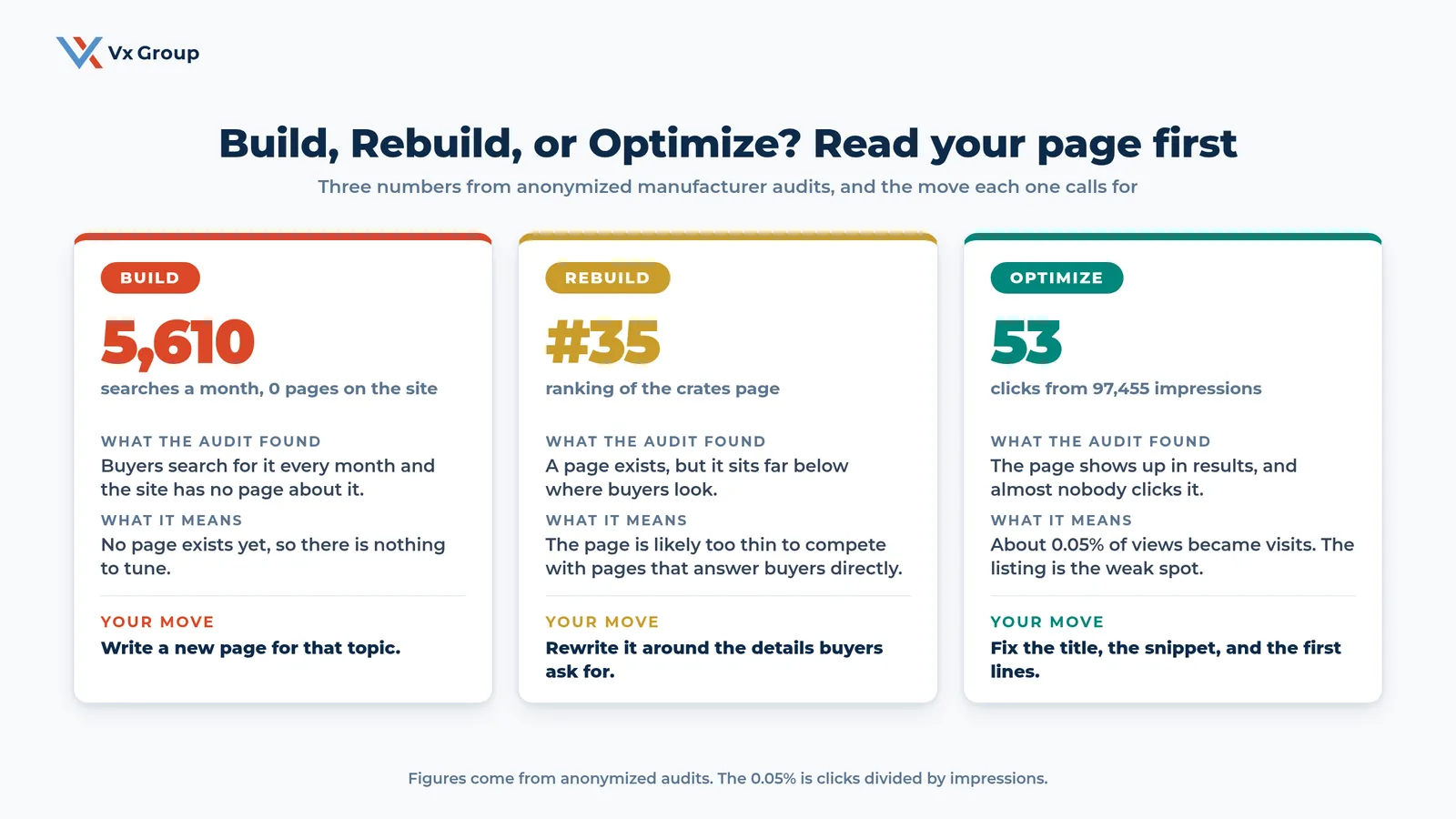
The three numbers in the graphic come from anonymized manufacturer audits. Each one points to a different fix:
| Signal | Example from the audits | Move | What the work looks like |
|---|---|---|---|
| Searches with no page | 5,610 searches a month, 0 pages | Build | Write a new page from scratch with the six details |
| A page that ranks badly | A crates page at position 35 | Rebuild | Rewrite the page around the details buyers ask for |
| A page that shows and gets ignored | 97,455 impressions, 53 clicks | Optimize | Rewrite the title, the snippet, and the first lines |
Defined Term: Impression.
One appearance of your page in a search results list. An impression is counted whether or not anyone clicks. Click-through rate is clicks divided by impressions.
Pull the searches buyers run and mark the page that answers each one
List the 30 to 50 phrases that describe what you sell, using your page inventory, your sales team’s call notes, and a keyword tool. Beside each phrase, write the URL of the page that answers it. A blank is a Build. This is how an audit finds a block of 5,610 monthly searches with no page behind it: the demand was visible all along, and nobody had matched a page to it.
Check the position of every page that exists
Open Google Search Console, go to the Performance report, and filter by each page. Note the average position for the main phrase. A page averaging position 35 sits on the fourth page of results, where almost no one looks, which is where the crates page in the audit sat. A page that deep usually has a coverage problem: it exists, and it does not say enough to compete.
Divide clicks by impressions on every page that already ranks
For each page with good position and high impressions, divide clicks by impressions. In the audit, 53 clicks on 97,455 impressions is about 0.05%. A figure that low means buyers see the listing and skip it, so the title or the snippet fails to tell them the page has what they need. A full rewrite would be overkill. A better listing is the fix.
Apply one rule to decide the move
Use this rule for each topic:
- No page exists: Build.
- A page exists and the average position is past 20: Rebuild.
- A page sits in the top 20 and the click-through rate is under 1%: Optimize.
- A page sits in the top 20 and the click-through rate is healthy: leave it alone and spend the time on a Build.
Treat the 20 and 1% thresholds as starting points. Adjust them to your market after your first quarter of data.
Field Notes:
In an audit call, we put two lists next to each other on the screen. The left side holds the searches buyers run. The right side holds the page that answers each one. The empty cells on the right become the Build list, the pages sitting past position 20 become the Rebuild list, and the pages with high impressions and few clicks become the Optimize list. Owners can usually match the empty cells to questions their sales team already answers by phone.
What should you fix first on a page that already exists?
On a page that already ranks, fix the title tag, the search snippet, and the first two lines of the page, in that order. These three decide whether a buyer or an assistant sees a match. They also take an afternoon each, and they cost far less than a rebuild. The goal is to put the six details where the first reader looks.
Rewrite the title tag to carry the product, the material, and the place
A title tag has about 60 characters before search results cut it off. Use this pattern: product, material or process, certification or place, company name. For example: “Titanium Aerospace Brackets, AS9100D | Dayton, Ohio | Company”. Put the words a buyer would type at the front.
Write the snippet as an answer
The meta description is the sentence under the title in search results. Write it as a direct statement of what the page offers, up to about 155 characters, with two or three of the six details in it. Close it with a short invitation such as “Request a quote.” Treat each description as the buyer’s first read of your company.
Rewrite the first two lines of the page to state the spec line
Replace any slogan at the top of the page with the spec line you wrote earlier. Put it directly under the H1. This is the text most likely to be quoted by an assistant, so it has to hold the details: what you make, from what, to what standard, in what quantities, and where.
Add the specs as a table lower on the page
Move the specification data out of the PDF and into an HTML table with units in the column headers. Keep the PDF as a download for buyers who want it. Our guide to LLM SEO covers the full page anatomy an assistant can quote, including direct answers and FAQ schema.
What technical basics do manufacturing websites get wrong?
Manufacturing websites most often fail on five technical basics: text trapped in PDFs and images, product data loaded by scripts a crawler does not run, AI crawlers blocked in the site’s settings, slow pages, and missing structured data. Each one hides good content from a reader that cannot see it. All five are checks your web team can finish in a few days.
| Check | What to look for | Who can fix it |
|---|---|---|
| Text in files and images | Specs that exist only in a PDF, a drawing, or a picture of a table | Your marketing lead, with the web team |
| Script-loaded content | Product data that appears only after a script runs, such as a configurator | Your web developer |
| Crawler access | A robots.txt file that blocks crawlers such as GPTBot, ClaudeBot, or PerplexityBot | Your web developer |
| Page speed | Pages that take several seconds to load on a phone | Your web developer or host |
| Structured data | No Organization, Product, or FAQ markup on key pages | Your SEO plugin or developer |
Read your site the way a crawler does
Open a key product page, turn off scripts in your browser or view the page source, and read what remains. Whatever you can read is what a crawler that skips scripts can read. If your specs disappear, ask your developer to render them as plain HTML on the server.
Open robots.txt and check which crawlers are allowed in
Type your domain followed by /robots.txt into a browser. Read the lines that begin with “Disallow.” If a line blocks a crawler from the whole site or from your product folders, ask your developer why it is there. Some blocks exist for good reasons. Make that choice on purpose, because a blocked crawler cannot read your pages at all.
Move catalog specs out of PDFs and into pages
A catalog PDF can be a fine download. As the only place a spec appears, it is a gap. Take the data from the PDF, put it on the product page as text and a table, and link the PDF as a supplement. Do this for your three top product lines first.
Add structured data to the pages that matter
Ask your developer or use your SEO plugin to add Organization markup site-wide, Product markup on product pages, and FAQ markup where a page answers questions. Structured data tells a machine what each item on the page is. It gives you no extra position by itself, and it removes guesswork for the reader.
Who should do the work, and how long does it take?
An owner or sales leader should own the work, with a marketing lead or an outside partner handling the writing and the web team handling the technical fixes. A first pass on three product lines takes about a quarter. The information comes from your sales team, your quote templates, and your engineers, so the project goes faster when they are in the room early.
| Weeks | Task | Output |
|---|---|---|
| 1 to 2 | Write the buyer prompts, count detail matches, and build the page inventory | A scored list of pages and a Build, Rebuild, Optimize sort |
| 3 to 4 | Fix titles, snippets, and first lines on the Optimize pages | Rewritten listings on every page in the Optimize group |
| 5 to 8 | Rebuild the pages that rank past position 20 | Three to five rewritten product or process pages |
| 9 to 12 | Build new pages for the highest-margin empty cells, then fix technical gaps | New pages and a clean crawl check |
Pull the details from the people who already have them
Your sales team answers these questions every week. Ask each person for the five questions buyers ask on first calls, and the five details buyers ask about last. Your engineers hold the tolerances and materials. Your quality manager holds the certifications. Fifteen minutes with each gives you most of what the pages need.
Decide what stays in-house
Most manufacturers can write the spec lines and the page content themselves, because the knowledge sits in the building. Technical fixes, structured data, and search console work usually go to a web developer or an agency. If you bring in outside help, ask them to start with the page inventory and the scored buyer prompts. A good agency will want to see those first.
For a site that needs more than page fixes, our guide to a B2B website redesign covers what to settle before the design changes.
How do you measure whether manufacturing SEO is working?
Measure four things: whether assistants name your company when you run real buyer prompts, the position and click-through rate of your target pages, the number of inquiries that mention a detail from your pages, and how new customers say they found you. Traffic alone is a weak signal, because an AI answer can send a qualified buyer to you without any trace in your analytics.
| Measure | How to check it | How often |
|---|---|---|
| Named in AI answers | Run ten buyer prompts in two assistants and record who gets named | Every quarter |
| Detail match score | Count the details each key page states against its prompt | After each page change |
| Position and click-through rate | Google Search Console, page by page | Monthly |
| Inquiry quality | Count inquiries that mention a spec, a tolerance, or a certification from your pages | Monthly |
| How they found you | Add one question to the first call and log the answer | Every new inquiry |
Run the same ten prompts every quarter
Keep a results table with the prompt, the assistant, the companies named, whether yours appeared, and what the assistant said about you. Compare each quarter to the last. A move from one prompt in ten to four in ten is the result to look for.
Ask every new customer how they found you
Add one line to your intake or first-call notes: “How did you find us?” Include “an AI assistant” as an option to listen for. Over a year, the log shows you how much of your new business starts in an assistant, which no dashboard can tell you.
Our guide to lead generation for manufacturers covers what to do once those inquiries arrive.
What mistakes should manufacturers avoid?
Seven mistakes cost manufacturers the most. Each one is common, easy to spot in an audit, and cheap to fix once you see it.
- Writing a capabilities line that fits every shop. If your competitor could paste it onto their site, it gives an assistant nothing to match.
- Leaving the tolerance, run size, or certification out. Each one is a detail a buyer asks about. A missing detail is a missed match.
- Putting specs only in PDFs or images. Move them to text and tables.
- Building pages for phrases that no buyer types. Use your sales team’s call notes before a keyword tool.
- Chasing volume. A phrase with 50 monthly searches that matches your best-margin product is worth more than a phrase with 5,000 that matches nothing you sell.
- Rewriting pages that rank well. A page with a click-through rate under 1% needs a better title and snippet, so rebuild it only if the page itself is thin.
- Judging the work only by website traffic. Run the buyer prompts and read what the assistants say.
Where should an owner start this quarter?
Start with your three highest-margin product lines. Write three buyer prompts for each, score the current page against each prompt, and sort every topic into Build, Rebuild, or Optimize. Fix the Optimize pages first, because they take the least time, then rebuild the weakest page, then build the largest gap.
Here is the first-week list:
- Pick the three product lines that carry the best margin.
- Write three buyer prompts per line, using the six-detail template.
- Score the page for each prompt, and write the number beside it.
- Pull impressions, clicks, and average position for each page from Google Search Console.
- Mark every topic Build, Rebuild, or Optimize using the rule above.
- Rewrite the first two lines of your best page as a spec line, and publish it.
Keep the scorecard. It shows within a quarter whether the changes are moving your company onto the buyer’s shortlist.
If you want a second set of eyes on the results, we are glad to walk through them with you.
Ready to grow?
Bring your three prompts and we will score your pages against them and sort your topics into Build, Rebuild, and Optimize.
FAQs
About the Author: Jacob Camhi
