

Knowledge Management in Manufacturing: A Guide for Owners

Knowledge management in manufacturing is the work of getting what your best people know out of their heads and into written steps, clean files, and shared habits. Start with your most experienced people and your most repeated jobs. Write those jobs down as SOPs, label the files, and name an owner for each one.
TL;DR
- Knowledge management in manufacturing means capturing how the work gets done, so the business keeps running when a veteran retires, quits, or takes a week off.
- Most of that knowledge lives in a few people. The shared drive holds old files that nobody has labeled or sorted.
- AI gives poor answers from a messy drive. Clean files come first, and clear SOPs come second.
- AI is also the fastest way to write the missing SOPs. Record a person doing the job, and AI can draft the steps in minutes.
- The hard part is getting a whole team to follow one person’s best method. Give every SOP an owner and a review date.
- A four-week start is enough to protect your top five jobs.
A manufacturer with 40 employees may have three or four people who know how everything really works. One knows which settings keep the old press from jamming. One knows which customer needs a call before every shipment. One knows why the quote template has that odd line at the bottom.
When any of those people leave, the knowledge leaves with them. The company pays for it in scrap, late orders, and new hires who take a year to get up to speed.
This guide is for owners and presidents of privately held manufacturers, roughly $5M to $50M in revenue. It covers what to capture first, how to clean up your files, how to write SOPs quickly with AI, and how to get a team to follow them.
What is knowledge management in manufacturing?
Knowledge management in manufacturing is the practice of capturing, organizing, and sharing what a company knows about making its product and serving its customers. The goal is that the right person can find the right answer on the day they need it, without tracking down the one coworker who remembers.
Defined Term: Tribal knowledge.
The know-how that lives in people’s heads and habits with no written record. Examples are machine quirks, customer preferences, and the reasons behind a process.
Search results for this topic come mostly from software vendors. They describe platforms and databases. Owners of $5M to $50M companies usually need something simpler first: a short list of what is at risk, a clean place to keep it, and a routine for keeping it current. Software helps after those three things exist.
There are three kinds of knowledge to manage:
- Process knowledge. How a job gets done, step by step. Setup, inspection, packaging, shipping, quoting.
- Customer knowledge. What each key customer expects, who the contacts are, and what went wrong the last time.
- Reason knowledge. Why you do it this way. Why a tolerance is tight, why a supplier is approved, why a price is set.
Reason knowledge is the rarest and the easiest to lose. A new hire can follow a process written down. Without the reasons, the same person will change a step and cause the problem that step was added to prevent.
Why does knowledge walk out the door at an owner-led manufacturer?
Knowledge walks out the door because it sits with a few long-tenured people, and no one asked them to write it down. Owner-led companies are especially exposed. The founder and the first employees built the business by doing the work, so the rules were never needed on paper.
The pattern is the same in most companies this size. Setup and machine knowledge sits with one or two veterans. Customer history sits with the owner and one account manager. Pricing logic sits with one estimator. Each of those is a single point of failure.
Three events expose that risk:
- Retirement. A skilled worker with 25 years on the floor gives notice. The company has two weeks to learn what took a career to build.
- A sudden absence. An illness or a resignation takes a key person out with no warning.
- Growth. The company adds a second shift or a second plant. The new crew cannot ask the veteran, because the veteran is busy on the first shift.
The same pattern shows up in sales. If you want to see it in your commercial team, read our guide to founder-dependent sales. Our article on building an infinite team covers the people side of the same problem.
How do you find the knowledge that lives in only one person's head?
You find it by asking a short set of questions about each key job and each key person, then ranking the answers by risk. The question for every job is simple: if the person who does this left on Friday, what would stop on Monday?
Ask five questions about every key job
Pick the ten jobs that matter most to shipping on time and keeping customers. Then ask these five questions about each job:
- Who does this job today?
- Who else could do it without help?
- Is there a written procedure, and where is it saved?
- When was that procedure last used or updated?
- What goes wrong when the job is done a different way?
The answers take a few hours to collect. Many owners learn from this exercise that the answer to question two is “no one” for half of their key jobs.
Rank each job by risk
Score each job on two things: how much damage a miss would do, and how few people could cover it. A job that only one person can do and that stops a shipment when it fails goes to the top of the list.
| Job | People who can do it alone | Damage if it stops | Save first? |
|---|---|---|---|
| Setup on the oldest machine | 1 | Line stops | Yes |
| Quoting a custom order | 1 | Lost sales | Yes |
| Final inspection of a key customer’s parts | 2 | Returns and rework | Yes |
| Packing and labeling for export | 3 | Delays | Later |
| Monthly tool maintenance | 3 | Slower output | Later |
The table is an example. Use your own jobs and your own counts. The goal is a ranked list of five jobs to document in the next month, and the person who owns each one.
Why does AI give poor answers from a messy shared drive?
AI gives poor answers from a messy shared drive because it can only work with what the files tell it, and most files say very little. Garbage in, garbage out. Eric Zoromski, CEO of Vx Group, made this point in a Nov 17 session on AI and return on investment. The session replay covers the full talk.
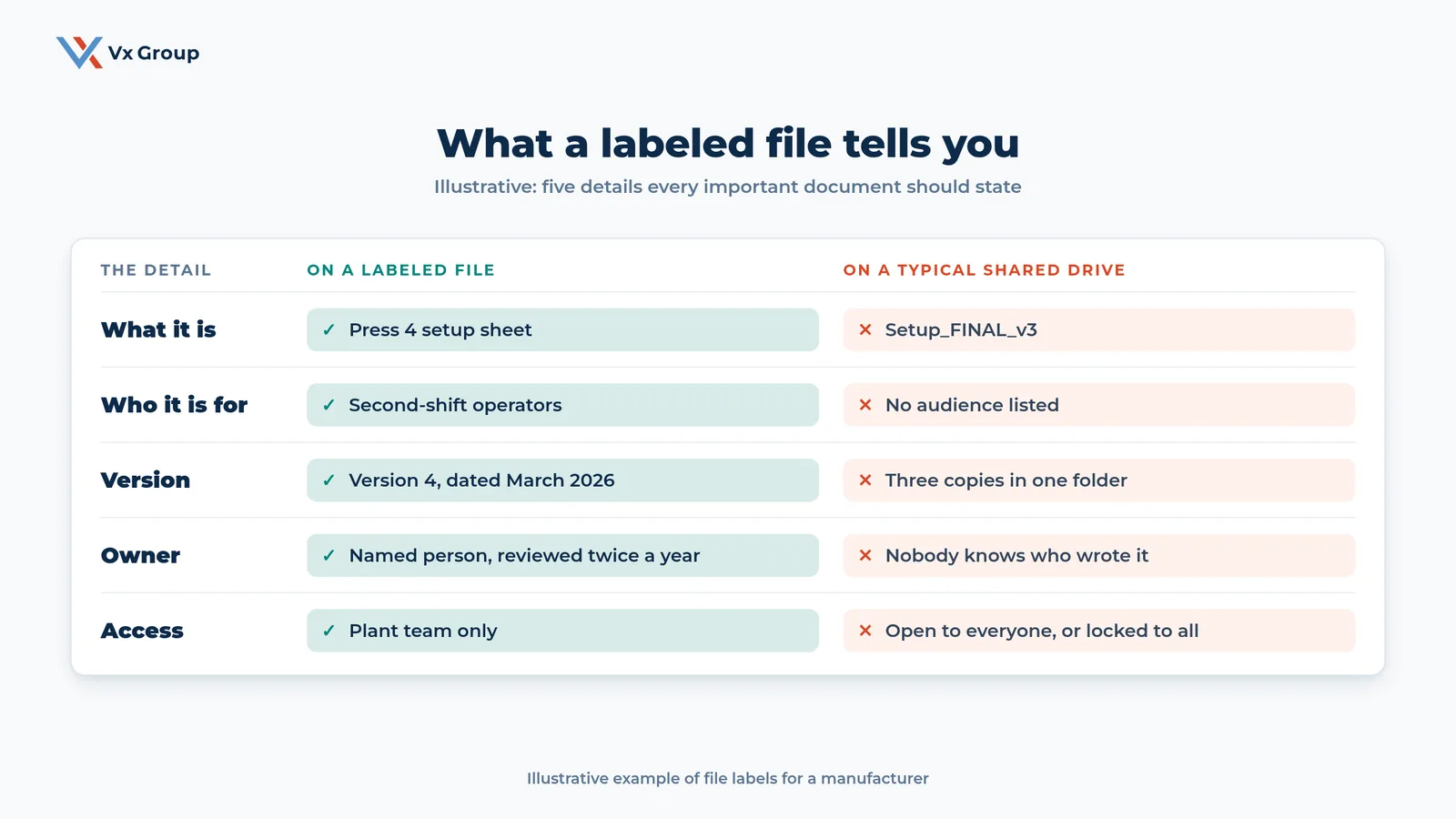
Large software vendors often say the same thing: point an AI assistant at your shared drive or SharePoint and all your knowledge is at your fingertips. For most manufacturers that drive is a mess. Files have names like “Final_v3_REAL” and sit in folders nobody has opened in years. There is nothing on a file to say what it is, who it is for, or who is allowed to see it.
An AI assistant that reads a messy drive will pull up an old price list as readily as the current one. It will quote a retired procedure with the same confidence as the active one. The answer sounds sure of itself and is wrong, and a new employee has no way to tell.
Data quality is the first thing to check before any team uses AI on company knowledge. The graphic shows what a clean file tells you that a messy one does not. In words: a clean file states what it is, who it is for, which version is current, who owns it, and who may see it. A messy file states none of these.
Cleaning up the files makes people faster too. A new hire who can find the right setup sheet in a minute does not interrupt a veteran.
How do you clean up your files so people and AI can find the right one?
You clean up your files by giving every important document five labels and by moving old versions out of sight. Start with the documents for your top ten key jobs. Do not try to clean the entire drive in one push.
Add five labels to every important file
Every file that matters gets the same five details. Put them at the top of the document, or in the file name and folder, so a person or an AI can see them without opening anything else.
- What it is. A plain name such as “Press 4 setup sheet.”
- Who it is for. The role that uses it, such as “second-shift operators.”
- Which version is current. A version number and a date.
- Who owns it. One named person responsible for keeping it correct.
- Who can see it. Everyone, the plant only, or leadership only.
Retire old versions on a set day
Pick one day each quarter to move outdated files into a folder called “Archive.” Keep them, because you may need them for a customer dispute. Move them out of the folders people search every day. One current version per document is the rule.
Keep one home for each type of document
Decide where each kind of document lives. Setup sheets go in one place. Customer specs go in another. Quotes go in the quoting system. When two places hold the same document, people trust neither one.
The 6-step AI readiness assessment puts this cleanup in the larger picture of whether a company is ready to use AI.
Ready to grow?
Talk through which knowledge in your business is most at risk with a team that works with owner-led manufacturers.
How do you write SOPs fast with AI?
You write SOPs fast by recording the person doing the job and asking AI to turn the recording into written steps. A task that used to take a veteran an afternoon of typing takes a few minutes of talking and a short review.
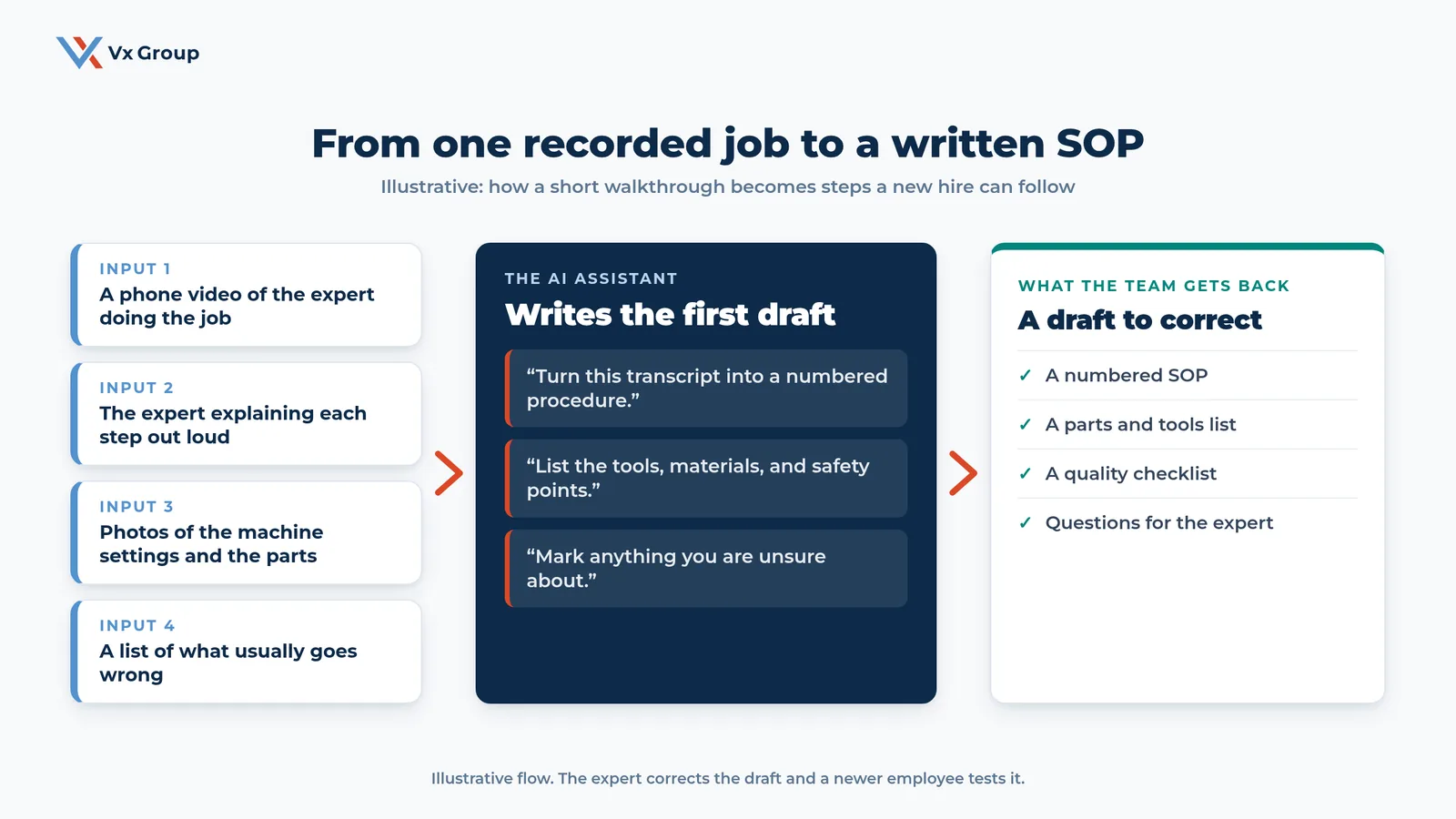
The graphic is illustrative. It shows three inputs from one job going through an AI assistant to produce three outputs a team can use. The steps below turn it into a routine.
Record the job as it is done
Ask the person who knows the job to do it once with a phone or a screen recorder running. Ask them to talk out loud: what they are doing, what they watch for, and why they do each step. Five to fifteen minutes of video is usually enough for one job.
Ask AI for a first draft
Give the transcript to an AI assistant and ask for a numbered SOP in plain language. Ask it to list the tools and materials, the safety points, the quality checks, and the things that commonly go wrong. A good first request is: “Turn this transcript into a numbered procedure for a new operator. Mark anything you are unsure about.”
Have the expert correct it
The veteran reads the draft and fixes what is wrong. This step takes minutes instead of hours, because correcting a draft is easier than writing from a blank page. Mistakes the AI made get caught here, and so do steps the expert forgot to mention.
Test it with a newer person
Hand the SOP to someone who has never done the job and have them follow it while the expert watches. Every place the newer person hesitates is a missing detail. Add it, and file the SOP with the five labels.
Write down the reasons
Add one line to each step that explains why it exists. “Wait 30 seconds before opening the door, because the part warps if it cools too fast.” Reasons are the knowledge that is hardest to rebuild once the veteran is gone.
How do you get a whole team to follow one person's best method?
You get a whole team to follow one person’s best method by giving each SOP an owner, a trial run, and a review date. One person’s great workflow falls apart when a whole team tries to do it the same way. Getting an SOP used takes more work than writing it.
Four habits make the difference.
Name an owner for every SOP
One person is responsible for keeping each SOP correct. The owner answers questions, collects changes, and signs off on updates. An SOP with no owner goes stale within a year.
Pilot with one shift or one cell first
Roll out a new SOP to one team and watch it for two weeks. Ask what slowed them down and what they changed on their own. The people doing the work often find a better way, and the pilot gives you a chance to learn it before the SOP goes to everyone.
Make the SOP the place where changes happen
When someone finds a better method, the change goes into the SOP the same week. If people keep improvements in their heads, the company is back where it started. The expert’s method becomes the team’s method only when the document stays current.
Set a review date
Put a review date on every SOP, usually every six or twelve months. A short review is enough: does the document still match how the job is done today? Your sales playbook and your sales onboarding plan need the same review rhythm.
How do you know if a department is ready for AI?
A department is ready for AI when its data is clean and its processes are written down. At the Nov 17 session, an attendee asked how to tell whether a team is ready, including its tech skills and data quality. Eric put data quality first and clear, scalable SOPs second.
Use the checks below for each department before you ask it to rely on AI.
| Check | Ready | Not ready yet |
|---|---|---|
| Files are labeled with what, who for, version, owner, and access | Most important files have all five | Names like “Final_v3” with no owner |
| Key jobs have a written SOP | Top ten jobs documented | Steps live in one person’s head |
| One current version of each document | Old versions archived | Several versions in the same folder |
| Someone owns each process | Named owner and review date | No owner |
| People know who may see what | Access matches the role | Everyone sees everything, or no one can find anything |
A department that fails the first two checks should fix those before adding AI tools. A department that passes them can use AI to answer questions, train new hires, and draft paperwork, and it will get answers worth trusting.
Technical skill matters less than most owners expect. People learn a new tool quickly when the files and procedures behind it are in good shape. Our article on AI for manufacturing covers where AI pays off once the basics are in place.
What mistakes should owners avoid with knowledge management?
Owners make the same five mistakes again and again. Each one wastes time and leaves the real risk in place.
- Buying software first. A knowledge platform filled with messy files returns messy answers. Clean the top ten jobs first, then pick a tool.
- Trying to document everything. Ten key jobs done well protect the business better than two hundred jobs done halfway.
- Asking people to write SOPs on their own time. Experts write slowly and resent the extra work. Record them doing the job and let AI draft it.
- Skipping the reasons. A procedure without reasons gets changed by the next person, who then repeats an old mistake.
- Letting SOPs go stale. An outdated SOP does more harm than none, because people trust it. A review date and an owner prevent this.
A sixth mistake belongs to the owner. If the owner holds knowledge no one else has, the first SOP to write may be the owner’s own. Customer history, pricing logic, and supplier relationships often sit in the founder’s head. Our guide to CRM adoption shows one way to get that customer history into a system the whole team can see.
Where should an owner start this month?
An owner should start with the five riskiest jobs from the ranked list and spend four weeks protecting them. The plan below takes a few hours per week from you and a few hours from each expert.
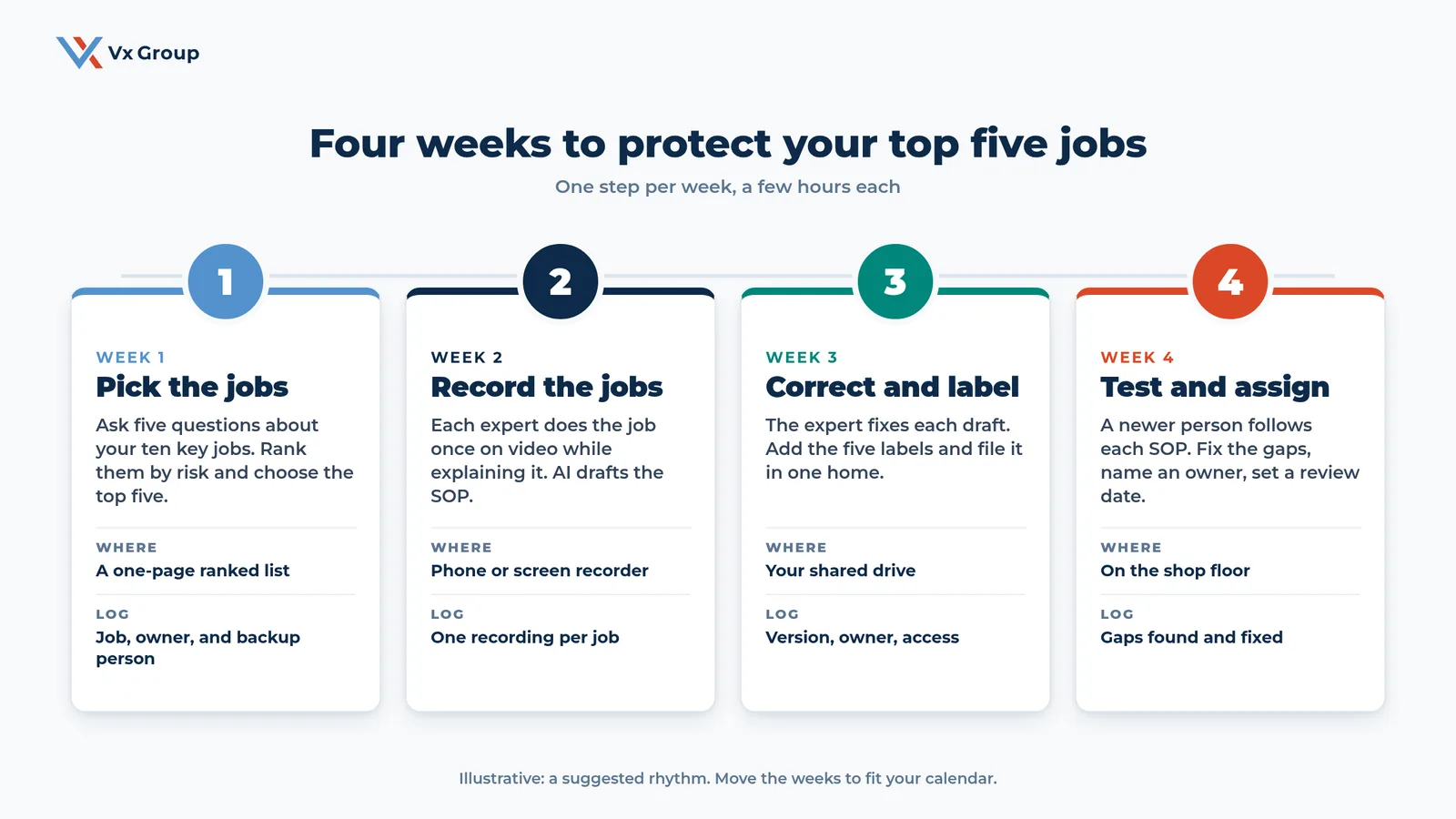
The graphic is a suggested rhythm, and you can move the weeks to fit your calendar. In words:
- Week 1: Pick the jobs. Ask the five questions about your ten most key jobs. Rank them and choose the top five.
- Week 2: Record the jobs. Have each expert do the job once on video while explaining it. Send each recording to AI for a first draft.
- Week 3: Correct and label. Each expert fixes the draft. Add the five labels and move the file to its permanent home.
- Week 4: Test and assign. A newer person follows each SOP while the expert watches. Fix the gaps, name an owner, and set a review date.
At the end of four weeks, five jobs no longer depend on one person. Repeat the cycle for the next five. Within a few months, the knowledge that mattered most is written down and current.
After that, ask the questions that connect this work to the numbers. Which jobs cause the most rework? Where do new hires take longest to get up to speed? Our guide to business leading indicators shows how to track the signals early.
Conclusion
Knowledge management in manufacturing protects what your people know. The first step is small: pick ten key jobs, rank them by risk, and document the top five. Clean files and written SOPs make your team faster today and make AI useful later.
If you do one thing this week, ask your longest-serving employee which job would stop if they were out for a month. Then record them doing it.
Which of your key jobs depends on one person right now? And have you asked that person to show you how it works?
Ready to grow?
Talk through how to protect the knowledge in your business with a team that works with owner-led manufacturers.
FAQs
About the Author: David Tisdale
